User management — legacy configuration guide
Ownership matrix
| Owner / scope | Legacy | Nextgen |
|---|---|---|
| Project / platform core | Company languages, employee field definitions, legacy navigation/profile rights, import activation and identity-source setup. | Space and action permissions, visibility resolution, API provisioning and group-rule consumers. |
| Customer administrator | Authorized employee creation, profile maintenance and activation controls; configured columns and filters. Import access requires separate activation/rights. | Authorized redesigned user list, two-step manual creation/editing and status maintenance; roles/groups/visibility are separate setup areas. |
The legacy and redesigned lists can coexist in the company workspace. Access to the entry point and permissions within the redesigned list are separate; configure and review each through its authorized workflow.
Customer administrator — legacy
Manual employee creation
Use Employees → Add Employee. Review the blank form and its available company language before any creation.
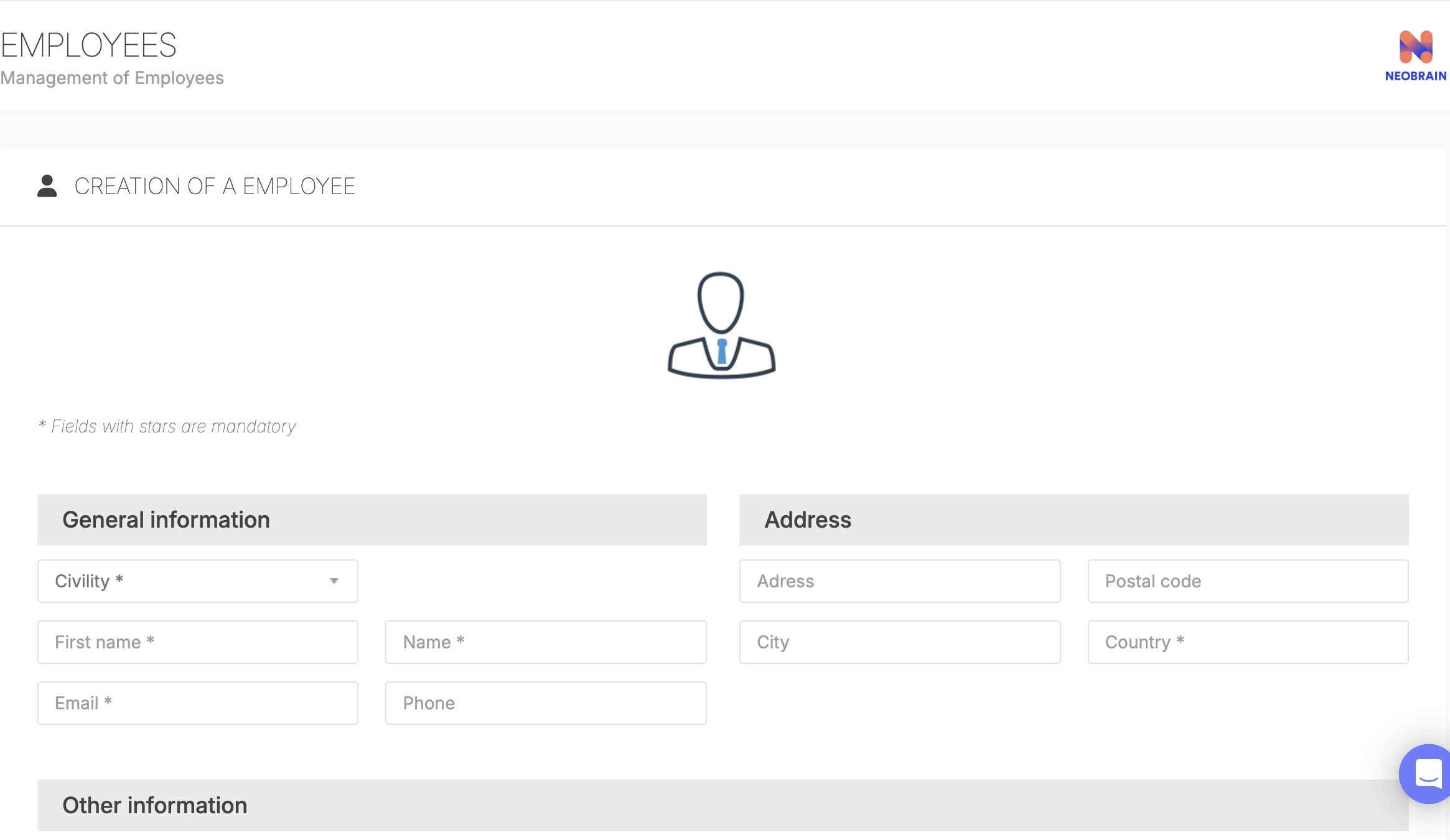
The legacy form groups identity, contact, address, employee details and language. Its fields and login-details option differ from the redesigned wizard.
| Group | Configuration and rules |
|---|---|
| General information | Civility, first name, last name and email. Use a unique email address; an existing address cannot be used for another user. |
| Address / contact | Phone, address, postal code, city and country fields. The country control may be replaced by a subsidiary selector when that option is configured. Follow the requirements shown in your form. |
| Other information | Optional person number and free-text employee position. Position is not automatically a reference-job attachment. |
| Language | Choose one of the languages enabled for the company. Available choices depend on company configuration. |
| Referent parameters | Available assignment options depend on context. If no referent is selected, the form can use the current manager account. |
| Send login details | This option is available only when enabled for the company. If it is marked OPTION NOT ACTIVATED, the form does not send login details. Creating the user does not itself confirm that login details were emailed. |
| Data-processing confirmation | Read the confirmation and select it only when the organization’s required authorization and employee notification are complete. |
| CREATE COLLABORATOR | Creates the user and related employee records. Reopen the record to confirm details. |
For user-facing entry steps, see Create using the legacy Add Employee form.
Columns, profile fields and lifecycle
The legacy table can restore saved columns and filters. Availability of its column chooser and active-state column depends on configuration. Display controls do not grant roles. Customer-specific fields and organizational relationships require their own configuration and may not be available as filters in both lists.
Account status handling differs between legacy and nextgen. Before reactivating an account, confirm the intended email identity and follow your organization’s lifecycle process. The technical guide describes the implementation differences.
Platform-team reference — legacy
| Dependency | Verified source and effect / default limits |
|---|---|
customer_r, customer_c, customer_u | Legacy profile rights for employee access/creation/update. List and create controllers apply their own checks; scope and privileged paths still matter. |
smr_users_people_access | New-list navigation right in config/configuration/default_permission.yml. Checked bundled presets set it false for admin_rh/hrbp/manager; that is not the effective tenant value or the playbook's recommended setup. |
enable_new_neobrain_hybrid_platform / theme rollout | Hybrid integration and modern shell are different concepts. CompanyNavigationExtension::getSmrUsersPeopleFeature consults allowed admin/personal spaces. Do not infer API grants from theme activation. |
disabled_users_r | Participates in active-state column visibility in ProspectBundle::listAction. |
hide_colaborator_list_filter_button | Can hide the column selector; the controller can force the permitted active-state column into saved columns. |
select_filiale_bo | Can replace the legacy country form field with subsidiary handling. |
| Company languages / email setting | Feed the language picker and availability of login-details sending. Effective tenant defaults were not changed or exported. |
| Import Center / visible user fields | Separate activation, data-manager rights and import-specific mapping/validation. No import interface was exercised. |
The SMR playbook, v3, 24 September 2026, recommends preparing users/groups before campaigns and still using the legacy Import Center for user ingestion. Treat this as Documented in Confluence, not automatic provisioning or migration of roles.
Imports, identity ownership and rollout
Documented in Confluence: Import Center for Users, v2, 29 April 2025, describes parsing → mapping → validation/preview → import, asynchronous processing, valid-row import and email-based updates. It recommends creating users before manager links and preparing visible SmartEditor fields first.
The same page contains inconsistent statements about job title versus job code and deactivation availability. Do not copy those as a current universal template. Nextgen has a separate /api/v1/user/import upsert contract keyed by employee/external ID or email, with its own scopes and DTO. Agree identifiers, field ownership, empty-value handling, manager ordering, activation semantics and notification behavior with the integration owner before any import. No import, SSO configuration or external sync was executed.
For rollout, test representative existing/new identities, EN/FR labels, inactive state, duplicate email, job assignment and allowed/denied population. Verify downstream group membership and the true account state. Document field ownership so manual edits are not unexpectedly overwritten by an external flow. Recovery depends on an approved source-data/backup process; no automatic global rollback was established.
Implementation notes and limitations
See the technical guide for the user APIs, field mapping, status lifecycle and integration dependencies.
The technical guide identifies behaviors that depend on tenant configuration or external services, including email delivery, SSO, imports, session revocation and cross-generation storage. Confirm those dependencies with the platform or integration owner before configuring a production workflow.
Last updated on 3 November 2026