Job galaxy — configuration guide
Prepare access, job data, matching scores and career-plan dependencies before activating Job galaxy for employees. Read the functional guide for the employee journey and technical guide for request and data contracts.
Prerequisites and responsibility
An authorized company administrator or implementation team manages activation and matching configuration. HR maintains current-job assignments, job descriptions, skills, translations, families and career-plan horizons. Employees explore the map and manage their own favorites/plans.
Observed in application: Jim Carter could use Nos métiers → Galaxie in PS Testing 2026 and switch to Espace manager. The dedicated galaxy parameter page returned You are not authorized to access this resource. Manager access is therefore not proof of configuration access. No administrator identity or other tenant was used.
Verified in code: SettingController::galaxyParametersAction checks the user's school relationship and denies missing/child-school contexts. The form is disabled when galaxy_module is off. An authorized administrator can reach the galaxy card from company account settings; that administration journey was not available to Jim and its exact deployed menu labels were not verified.
1. Prepare the job framework
- Assign a valid current job to each intended employee.
- Publish eligible job descriptions: active, not hidden and linked to a status whose visibility is enabled.
- Supply a job-title translation for the employee's interface locale.
- Configure a job field in Smart Editor carrying the job_family flag, with the relevant family assignments and translations. The galaxy service raises an explicit configuration error if the job-family field is missing.
- Maintain required job skills, expected levels, relevant weights and employee skill ratings.
- Check job grading where used. Unless disabled, a non-zero current grade restricts the galaxy to positive grades from the current grade to current grade + 2.
- Confirm that the selected matching process has produced saved employee/job scores. Enabling the menu does not by itself generate those rows.
Verified in code: family assignment is applied before score sorting and the 400-job cap. Search subsequently filters only the loaded jobs. Correct source data before treating a missing search result as a UI issue.
2. Check activation and dependencies
| Setting/dependency | Scope and effect | Evidence |
|---|---|---|
galaxy_module | Company feature switch; controls the galaxy tab and page access. | Verified in code; enabled behavior observed. |
| Assigned employee job | Required for the enabled submenu and current-job map context. | Verified in code; populated context observed. |
hide-job-grading | When active, clears the grade filter passed to the galaxy job query. | Verified in code; tenant value not inspected. |
job_proximity_matching_red, ..._orange, ..._green | Company score intervals, JSON keys first and second, converted to floats. Missing bounds fall back to 0 and 1. | Verified in code; actual tenant thresholds not inspected. |
careerplan_fo and target horizons | Career-plan navigation and the company's available plan targets. | Verified in code; plan dialog observed, horizon save not tested. |
module_formations_fo | Passed to the galaxy client for training-module availability. Relevant training data is also required. | Verified in code; training link observed. |
galaxy_test_un_metier | Optional mentor integration with additional tenant/user eligibility checks. | Verified in code; not observed here. |
Use coherent, non-overlapping score intervals. The repository checks red first, then orange, and classifies remaining scores as green; the green range is not independently enforced by that SQL expression. The broad fallback 0–1 ranges are code fallbacks, not recommended rollout values. Obtain the approved company thresholds rather than copying invented defaults.
3. Distinguish path generation from proximity scoring
The checked settings template contains two different algorithm areas:
- Galaxy paths: Data Science API is disabled; Live AI computing is checked. The template comments state that SmartMobility currently uses Live AI for paths.
GalaxyController::computePathActioncallsGalaxyServiceand the legacyGalaxyProviderdirectly. - Job proximity:
JOB_PROXIMITY_ALGORITHMchooses how matching scores are computed. The template lists None (0), deprecated Live computing (1) and Data Science API (2), Live AI computing (3), and Job Proximity matching v2 with semantic match (4), labeled default in the template. The actual PS Testing value was not read.
Changing a proximity algorithm is not equivalent to selecting another galaxy path algorithm. Confirm score refresh and downstream synchronization before evaluating the map. The nextgen GALAXY_PATH_ALGORITHM key and GalaxyAlgorithm enum do not prove the legacy path controller reads that key.
4. Understand retained parameter fields
The legacy form/model retain the following company parameters. Verified in code, not observed as editable by Jim:
| Field | Fallback / allowed values | Caveat |
|---|---|---|
| Boost family | Off; On/Off | When Off, form post-submit resets K Family to 1. |
| K Family | 1; 0–1 | Retained family-boost parameter. |
| Max step | 3; entity validation 1–5 | HTML form permits 0–5, but entity validation rejects 0. |
| Edge threshold | 0; 0–1, form step 0.01 | Retained graph parameter. |
| N top | 5; 3–10 | Retained candidate count parameter. |
These fallbacks come from GalaxyApiParametersRepository::findForComputePath and entity constants. They are not evidence of saved company values. The current AI compute action does not pass these fields into GalaxyProvider::provide; do not promise that changing Max step, N top or Boost family changes AI routes. Path shortest/motivation/skills fields also remain in the model, but their existence does not establish three working live route modes.
5. Validate, roll out and revert
- Record the current activation, thresholds, proximity algorithm and source data with the authorized configuration owner.
- Correct the framework and matching data in the intended testing tenant.
- Have the authorized owner apply approved settings using the available administration form; do not bypass an access denial.
- Open an employee's galaxy, confirm the current job, search a known eligible target and inspect a generated route, skills and explanation.
- Check favorites and a clearly named test plan if persistence is part of acceptance; verify the saved target in Plans de carrières.
- Validate empty-result and restricted-account scenarios separately. Avoid interpreting a cached route as proof that new matching settings have taken effect.
- If needed, restore recorded values and reopen the galaxy. Turning off the module hides/disables access; the checked page gate is not a deletion operation for saved plans or favorites.
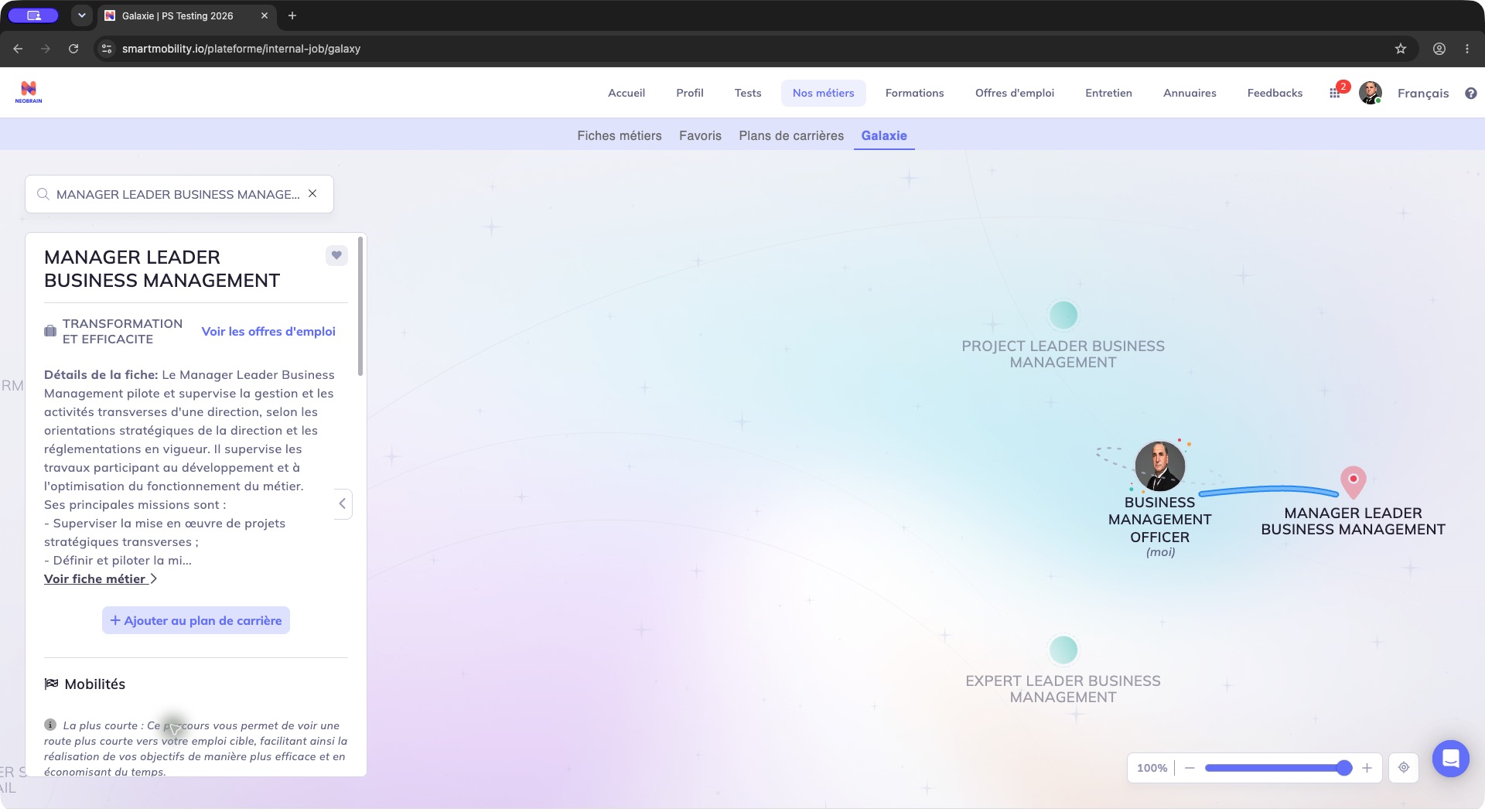
The selected target opens a job panel on the left and a highlighted route on the map. Read the target and route explanation, then open the job sheet if needed; the suggested route does not change your assigned job. The selected job panel provides a concrete acceptance check. Configuration controls are not fabricated in this employee screenshot.
Troubleshooting and generation differences
| Symptom | Configuration checks |
|---|---|
| Parameter page denies access | Authorized company/school context; manager workspace alone is insufficient. |
| No galaxy tab | galaxy_module, employee job and navigation context. |
| Blank/error map | Job-family Smart Editor field, translations, saved matching scores and browser resources. |
| Missing job | Active/hidden/status flags, locale, family, grading, score population and 400-job limit. |
| Unexpected colors | Interval overlap/fallbacks and saved score freshness. |
| Parameter edit seems ineffective | Retained graph fields versus current Live AI path computation. |
| Cannot save a career target | Existing plans (maximum three), available horizons and final association save. |
The live screen is legacy. Nextgen exposes related company configuration types, while AIhub exposes JPM scoring APIs. Neither establishes that the observed galaxy has moved to nextgen or calls AIhub on each target click.
Evidence and limitations
Observed in application: PS Testing 2026, Jim Carter, 23 October 2026; functioning galaxy, manager/personal workspace switching, denied dedicated configuration page. No settings or objects changed.
Verified in code: legacy SettingController::{galaxyParametersAction,galaxySaveAlgoAction}, Setting/galaxy.html.twig, GalaxyApiParametersType, GalaxyApiParameters, its repository, GalaxyService, UserJobMatchingRepository and submenu services; nextgen ConfigurationKey and GalaxyAlgorithm. Source locations are listed in technical.
Not verified: administrator form submission, deployed tenant parameter values, algorithm changes, score-refresh timing, rollback execution and optional integrations. The dedicated configuration screen was unavailable under the required Jim Carter account; this guide separates source behavior from live evidence.
Last updated on 3 November 2026