Talent Marketplace — administrator configuration
Responsibilities and scope
This page is for administrators preparing directory access, population visibility and field availability. Daily searches belong to the functional guide. Configuration ownership and implementation generation are separate dimensions:
| Owner / scope | Redesign — nextgen | Legacy |
|---|---|---|
| Customer administrator: functionality | Visibility groups and roles in the redesigned administration. Marketplace field metadata exists in nextgen-back; a corresponding nextgen field editor was not verified. | SmartEditor field controls for filters and profile details. Legacy permission/visibility entry points coexist with redesigned administration; do not assume both are authoritative for every tenant. |
| Project / platform core: platform team | Runtime availability of administration, API access and field mappings. No separate nextgen directory search activation was established. | Directory module activation, feature switches, matching data availability and AI integration. These are platform prerequisites rather than ordinary customer-admin actions. |
Observed in application: administrator navigation, redesigned visibility groups and an English legacy field-settings dialog were inspected on smartmobility.io. No setting was saved. English captures below were taken with the site in English; some tenant-defined values and legacy navigation labels remain untranslated.
Customer administrator — redesign (nextgen)
Prepare visibility groups and role scopes
Prerequisites: an admin account permitted to manage groups and roles, and a clear definition of the populations that should see each other. A manager/personal-space switch does not itself grant administrator privileges.
- Open Settings > Visibility.
- Review the visibility groups and their membership against the intended population.
- Identify the group needed for each role; when configuration changes are authorized, create or adjust the group using the administration workflow.
- Open Settings > Roles and review the role's actions and visibility scope. Groups define populations; creating a group alone does not grant directory access.
- Validate the resulting directory access with representative HR/manager and employee accounts separately.
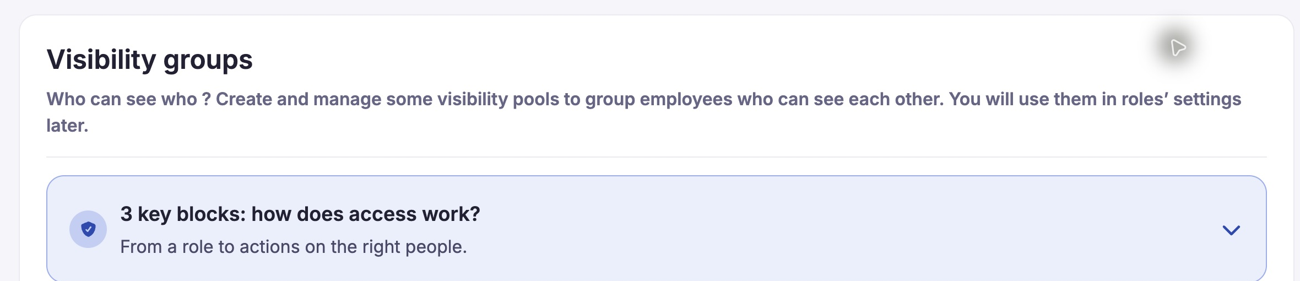
The Visibility groups page explains the population-scoping concept; it is not an employee search result. Use an authorized group-and-role configuration to define access before testing the directory population. Observed English nextgen screen embedded in the legacy application shell. The page explains that visibility groups are used in role settings. Tenant-defined group names are organizational data and may remain in French.
Verified in code: nextgen-front src/router/private-routes.ts maps visibility and role routes to src/modules/Users/VisibilityGroups/ and src/modules/Users/Roles/. The enclosing /company/ URL is not proof that the embedded screen is implemented in legacy.
Nextgen field metadata and coexistence
Nextgen-back exposes four separate marketplace field properties. They map to the same named legacy entity properties used by the directory, rather than establishing four unrelated settings in each generation:
| Field concern | API property | Legacy mapping |
|---|---|---|
| Employee filters | displayed_on_user_talent_marketplace | filterTmkpFo |
| HR/manager filters | displayed_on_manager_or_hr_talent_marketplace | filterTmkpBo |
| Employee detailed profile | visible_on_user_talent_marketplace_detailed_profile | isVisibleOnTalentMarketplaceDetailedProfile |
| HR/manager detailed profile | visible_on_manager_or_hr_talent_marketplace_detailed_profile | isVisibleOnTalentMarketplaceDetailedProfileBo |
Verified in code: AbstractFieldDTO initializes these properties to false; these DTO defaults do not establish persisted tenant defaults. A nextgen UI for editing them and precedence between every old/new admin control are Not verified. Use the verified editor for the tenant and avoid treating legacy and nextgen as independent configurations to duplicate.
Customer administrator — legacy
Configure marketplace fields in SmartEditor
Entry point observed: User menu > Configuration > SmartEditor, then the employee-profile or job section. In the English session, some landing-page labels remained French; the inspected field dialog itself was in English. Only use this entry point when available to your admin account.
- Open the relevant employee or job field in SmartEditor.
- Review its Filter on talent marketplace BO and Filter on talent marketplace FO settings independently.
- Review Visible on Talent Marketplace detailed profile - BO and Visible on Talent Marketplace detailed profile - FO independently.
- Choose the intended Visible / Not visible state for each applicable setting when performing an authorized configuration change.
- Review field order and translations. When changes are authorized, use Save changes, then verify the actual filter panel and detail view in each user context.
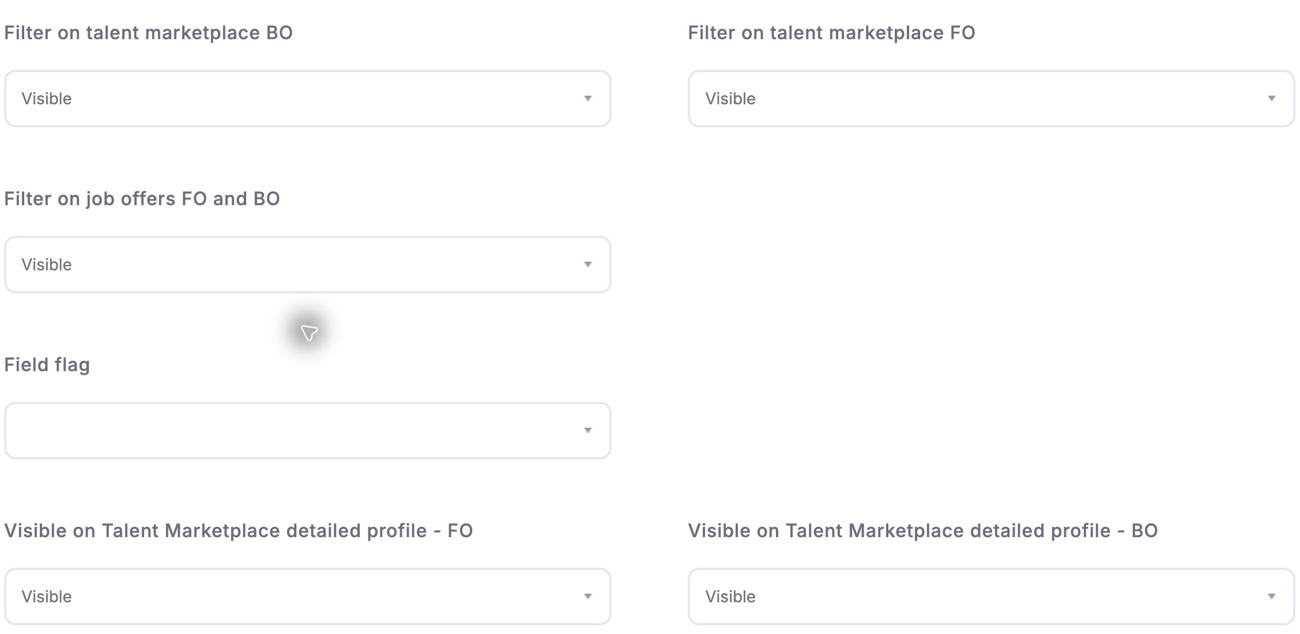
The field settings distinguish manager and employee filters from visibility in the detailed profile. Review the setting for the intended surface before saving; making a field searchable is not the same as exposing its profile value. The observed dialog shows distinct filter and detailed-profile settings. BO means HR/manager and FO means employee. Values shown belong to this existing field; they are not product defaults. The dialog was inspected without saving.
A field can be searchable without appearing in details, or appear in details without being a filter. General Filter in FO/BO, job-offer filters and ordinary profile visibility are separate controls; use the marketplace-specific settings for this task. Enabling a field does not populate missing profile values or activate a directory module.
Verified in code: TMKPFiltersType uses tmkp_bo for managers and tmkp_fo for employees. SearchCompanyEntityType::buildForm filters field definitions by filterTmkpBo or filterTmkpFo. The legacy SmartEditor template and CompanyEntityForm expose the four settings above.
Legacy access controls
The legacy Configuration landing page exposes Roles and rights and Visibility management entry points. They were observed as links, not exercised as an alternative permission system in this review. Confirm the tenant's supported administration path before editing both old and redesigned screens. No automatic migration, synchronization of every permission setting or override precedence is promised here.
Project / platform core — platform-team prerequisites
The following is a platform reference. Customer administrators should request missing activation or data dependencies through their platform contact; these identifiers are not instructions to edit server configuration or a database.
Nextgen prerequisites
Ensure the redesigned visibility/role administration is available to the intended administrators and that the APIs expose the required field metadata. The verified nextgen implementation is an administration dependency; a separate nextgen employee-search engine or universal migration switch was Not verified.
Legacy activation and feature dependencies
| Capability | Platform reference and dependency |
|---|---|
| Employee directory | annuaire; evaluated by EMPLOYEE_BOOK_FO_ACCESS. |
| HR/manager directory | annuaire_bo with manager/master-school and role rules; high-potential access can also allow the directory. See EmployeeBookVoter. |
| Contract filter | Manager company_book_contract_filter_bo; employee company_book_contract_filter_fo. |
| City filter | Manager city_filter_bo; employee city_filter_fo. |
| Languages | Manager language_filter; employee language_filter_fo. |
| Employee-job criterion | Manager show_job_exclusion; employee show_job_exclusion_fo. |
| Mobility preference | Manager show_internal_mobility; employee show_internal_mobility_fo. |
| School | Manager company_book_school_filter_bo; employee company_book_school_filter_fo. |
| Offer matching | job_matching_bo / job_matching_fo, plus the availability condition checked by UserCustomJobMatchingService. Enabling a switch alone is insufficient. |
| HR/manager AI prefill | tmkp_ai_search, directory permission, server AI integration and displayed filters. No employee equivalent was found in the inspected controller. |
| Profile hiding | collaborator_can_change_visibility; detailed access rules and the employee profile-visibility action are distinct from field visibility. |
Verified in code: areScoresBySettingAvailable() checks for tenant-specific matching storage in the active-settings list. Despite its name, it does not prove that rows contain fresh, complete scores. Provisioning and score computation belong to the platform team; no manual database procedure is prescribed here.
For AI prefill, the platform team supplies the server URL/key configuration, validates remote availability and enables the feature only when ready. Customer administrators validate the visible outcome, not the server credential. No universal feature-switch defaults or inheritance precedence was verified.
Validation, rollout and rollback
Recommended procedure (Inferred, operational guidance):
- Record effective module activation, role scopes and the four field settings before changing them.
- Validate both personas and both languages. If employee access redirects to home, check employee activation rather than assuming the manager view grants access.
- Check an allowed and an excluded profile, plus a field shown only in one context.
- Test each enabled filter with populated data. A visible control with an empty list may reflect missing reference data.
- If offer matching is missing, check activation and backing-data availability separately. If AI is missing, check its manager-side activation and integration.
- If validation fails after an authorized change, restore the recorded settings through the same supported administration path and verify access again. Disable AI independently if only prefill is affected.
These are rollout checks, not a declaration that every case passed. No configuration was changed during documentation work.
Evidence and limitations
Reviewed 15 October 2026.
- Observed in application: nextgen visibility administration in English/French, legacy Configuration and SmartEditor navigation, and the English field dialog. The French guide has its own localized screenshots. The supplied functional account can use the manager directory but is redirected from the employee directory; the effective cause was not changed or fully diagnosed.
- Verified in code: legacy
src/Company/EmployeeBookBundle/Security/EmployeeBookVoter.php, bothCompany/EmployeeBookBundleandCustomer/EmployeeBookBundlecontrollers,src/Form/Type/TMKPFiltersType.php,src/Form/Type/CompanyEntityForm.php,src/Company/SwpBundle/Form/Type/SearchCompanyEntityType.php,src/Company/SwpBundle/Resources/views/List/Forms/form.html.twig,src/Service/UserCustomJobMatching/UserCustomJobMatchingService.php. - Verified in code: nextgen-front
src/router/private-routes.tsand role/visibility modules; nextgen-backsrc/Domain/V1/Field/DTO/AbstractFieldDTO.phpandsrc/Http/Api/Routing/V1/custom_field.yaml. - Not verified: all old/new role-setting precedence, a nextgen field-editor UI, deployed feature defaults/inheritance, score freshness, AI service availability and a complete rollout/rollback exercise. Existing access does not imply permission to alter platform-core settings.
See Functional guide for both user journeys and Technical documentation for implementation contracts.
Last updated on 3 November 2026