Intelligent skills management engine — configuration guide
Configure the engine by choosing which referentials supply library results and which supply personalized suggestions. These are separate source lists. Then check feature activation, assessment scales, quotas and access in the employee's workspace.
The functional guide describes the employee journey. The technical guide explains service selection and the differences between the older and newer inference paths.
Access and prerequisites
Use an account authorized to maintain company configuration and referentials. A manager who can inspect employees is not necessarily authorized to change source settings. Ensure that the company has available skills and that selected observatories contain indexed skills. Personalized inference also needs profile inputs supported by the selected implementation.
Observed in application: Jim Carter could switch between manager and personal spaces in PS Testing 2026 and use the library. Opening Menu utilisateur → Configuration returned You are not authorized to access this resource. Company configuration values could therefore not be inspected with this account. The settings below are Verified in code, with live configuration access and saving recorded separately under evidence.
1. Select observatories independently for each journey
Verified in code: the company repository configuration page is handled by company_account_repository (/company/account/setting/repository with the company routing prefix). Its template contains two independent multi-select fields populated from available observatory slugs.
- Open the company repository configuration page with an authorized account.
- In the skills-identification section, select the observatories required for ongoing skill suggestions.
- In the library/observatory section, select the observatories required for keyword search.
- Save the form and reopen it to verify that both lists were retained.
- Validate each employee journey separately; changing one list does not configure the other.
Section descriptions here are based on template translation keys, not a claim that those exact English labels were observed in PS Testing. The precise localized wording depends on deployment.
| Control / setting | Values and scope | Effect |
|---|---|---|
skill_suggestion_observatory[] → Setting.skillSuggestionObservatories | Multiple available observatory slugs; company setting | Adds selected observatory sources to personalized skill inference. |
skill_library_observatory[] → Setting.skillLibraryObservatories | Multiple available observatory slugs; company setting | Adds selected observatory sources to keyword-based library search. |
Company referential public | Available/public company referentials | Included in the inspected search and inference source lists. Here public controls catalog availability; it is not proof of anonymous Internet access. |
Company referential main | Main-reference marker | In the newer library search path, helps order priority company referentials. |
The controller intersects submitted slugs with known observatories. Unknown values are discarded. Empty persisted lists read as []; they add no observatory IDs through these settings. Empty lists do not remove available company referentials from the inspected request builders. No universal list of observatories or product-wide default selection was established.
2. Check feature activation and service mode
The following identifiers are internal configuration references, Verified in code. Use supported company configuration tooling and validate the effective value for the target tenant; do not treat a source-code identifier as an employee-facing menu label.
| Setting | Purpose and caveat |
|---|---|
module_suggestion_skill | The inspected profile template uses this switch to include the ongoing suggestion panel. It does not control every library-search entry point. |
suggestion_skills_v2_ds_api | Selects the newer SkillSuggestionV2Service for ongoing suggestions, acceptance and refusal. Otherwise, the persisted legacy service is used. |
skill_library_api_url_skills_qdrant_single | Selects the newer library URL and company-referential priority behavior through SkillLibraryUrlManager. This is separate from the ongoing-suggestion mode. |
display_old_version_homepage_fo | Participates in a compatibility condition in the suggestion voter. Voter access and actual profile-panel rendering are separate checks. |
fo_no_display_motivation_add_skill | Hides motivation in the employee library flow and bypasses its browser-side motivation requirement. |
max_skill_outside_job | Integer cap on skills outside the assigned job. Validation applies when the value is at least 1 and the employee has a job. |
Do not infer deployed values from configuration catalog entries. The active tenant settings and runtime access checks determine behavior. No inherited company/subcompany precedence or universal enabled defaults were established for this feature.
3. Align rating scales and profile inputs
Observed in application: Jim's library displayed four mastery stars and four motivation hearts. Both fields were required by the observed selection flow before saving became available.
Verified in code: the library uses company assessment settings and template defaults; do not hard-code four levels into rollout instructions. Motivation visibility can be disabled by the switch above. Confirm the labels presented to employees, not just the number of rating controls.
For ongoing suggestions, the older path extracts job titles from work experience and requests up to 16 skills per title by default. The newer path uses experiences, diplomas and interests, requests up to 15 skills, and prioritizes available company referentials. These are implementation request values, not fields in the repository configuration form. Neither path automatically gives the employee a mastery rating.
4. Validate the employee result
- Stay in the intended company and switch to the employee's personal workspace.
- Open Profil → Mes compétences → Ajouter des compétences.
- Search for a known term represented in the internal catalog and selected observatories.
- Check the internal and external source headings and the relevance of returned labels.
- Select a candidate, check its assessment scale and motivation requirement, then remove the temporary selection if no profile change is needed.
- For the ongoing panel, verify that it appears and that the employee has usable profile inputs and remaining quota. Acceptance/refusal should be validated on designated test data.
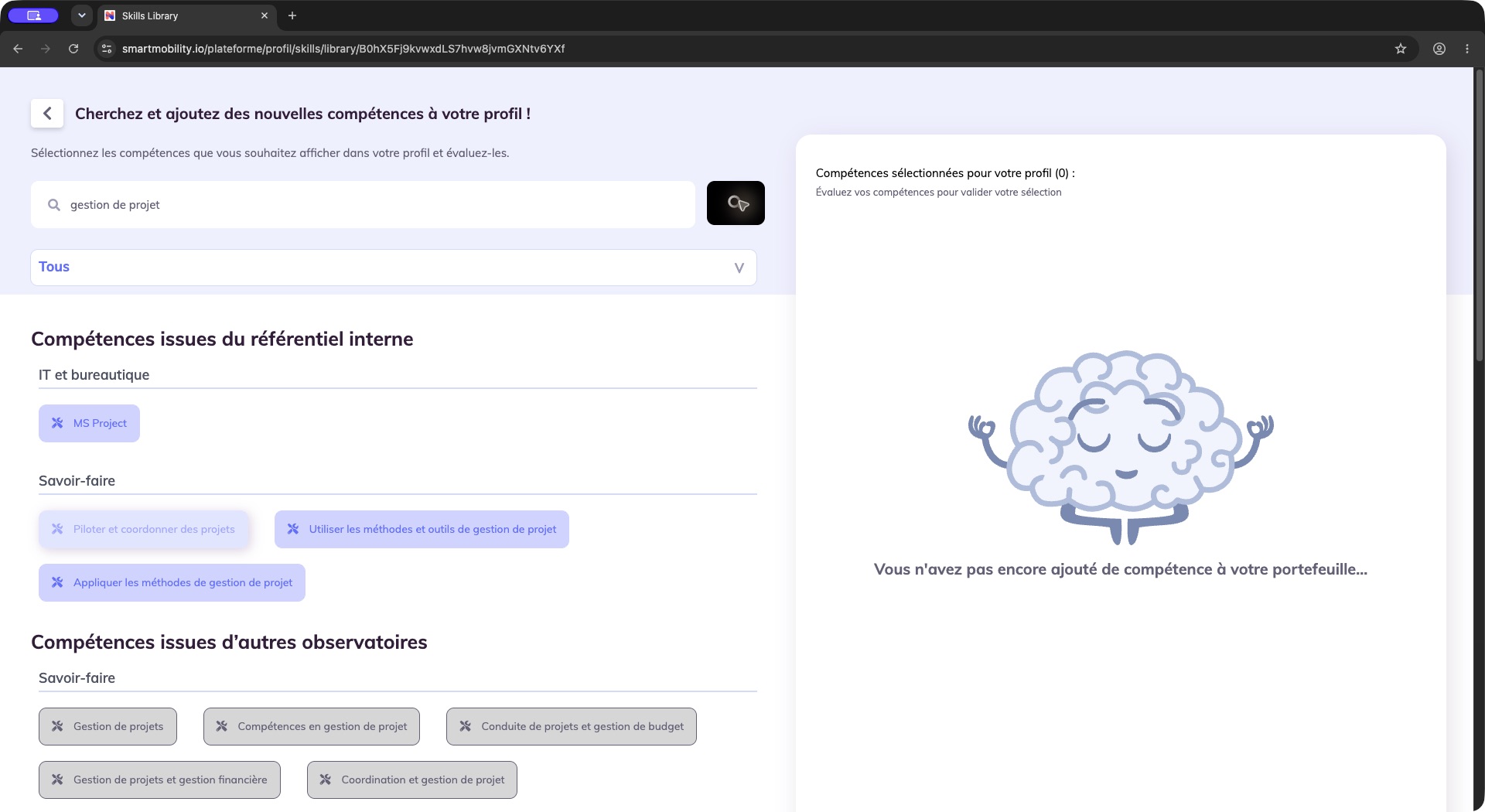
The keyword results are separated into internal-reference and other-observatory skills, with an empty selection panel on the right. Compare labels and source families before choosing a skill; a search result is not yet in the employee portfolio.
Observed in application: gestion de projet returned both source families for Jim. A selected candidate appeared in the right-hand panel with the expected ratings. This validates source availability for that search; it does not establish the exact configured slugs or the active inference mode.
Refresh, rollout and rollback
Verified in code: the newer ongoing-suggestion path stores a queue in the session. Changes to experiences, diplomas or interests trigger a listener that clears that session queue. A source-setting edit alone was not found among those listener triggers, so do not promise immediate queue replacement after changing observatories.
The older service tracks synchronization dates and only regenerates through its synchronization path when the latest synchronization is older than one month or absent. That is an eligibility check, not evidence of a monthly scheduler. Existing eligible suggestions can be displayed without regenerating them.
Inferred operational guidance: record both source lists and relevant effective switches before a rollout. Validate one test profile in each enabled journey. To reverse a source change, restore the previous lists and verify fresh results. Do not assume that removing a source deletes already assigned employee skills or previously copied catalog entries. Changing inference mode also changes persistence and undo semantics; treat it as a separate rollout decision.
Validation and troubleshooting
| Symptom | Configuration check |
|---|---|
| External skills appear in search but not personalized suggestions | Compare skillLibraryObservatories with skillSuggestionObservatories. |
| No continuous panel, working library | Check the panel switch and profile template separately from search-service selection. |
| Internal source missing | Check company attachment, referential availability, indexed content and query relevance. |
| Search gives no results despite selected sources | Check the resolved search service, source indexing and language handling. |
| Newer suggestions are empty | Check usable experiences/diplomas/interests, eligible referentials and existing/ignored skill exclusions. |
| Older suggestions do not refresh | Check synchronization age and eligible unresolved suggestions. |
| Quota refusal | Check assigned job, cap and current number of skills outside that job. |
| Save remains inactive | Complete every required rating; verify motivation visibility and validation agree. |
Legacy, redesign and evidence
The inspected screens run in the legacy application while service mode can select newer AI capabilities. A redesigned development-plan suggestion feature is not the replacement configuration for this engine. Targeted nextgen front/back inspection did not establish an equivalent multi-referential profile-library replacement.
- Observed in application: 23 October 2026, Chrome, PS Testing 2026 as Jim Carter; workspace switch, library search across both source families and selection/rating checks. Company configuration access was denied; no company setting was saved.
- Verified in code: legacy
Company/AccountBundle/Controller/SettingController.php::repositoryAction,Resources/views/Setting/repository.html.twig,Main/ConfigBundle/Entity/Setting.php,Customer/ProfileBundle/Services/SkillSearcher.php,Service/SkillLibraryUrlManager.php,Service/Skills/,Main/ConfigBundle/Security/Skills/SuggestionSkillVoter.phpandEventListener/SkillSuggestionRefreshEventListener.php(paths relative tosmartmobility-legacy/src/). - Inferred: rollout and rollback guidance follows the inspected source lists, queues and assignment model.
- Not verified: exact active slugs, deployed switch values, live configuration-save behavior, every role, production service configuration and deployed/local version parity.
The functional guide now includes the saved library addition and reopened profile result observed on 26 October 2026. These employee operations do not establish effective tenant-switch values or an administrator configuration save.
Last updated on 3 November 2026