Employee, manager and admin experience — configuration guide
For administrators arranging access, navigation and homepage variants. Use Functional for illustrated switching and each homepage, and Roles and permissions for the role-editing procedure. A workspace choice selects an existing entitlement; it is not a configuration shortcut for granting it.
Ownership and implementation generation
| Owner | Legacy | Redesign / nextgen |
|---|---|---|
| Platform / project team | Application roles, manager/employee records, privileged platform-console access, homepage/theme switches and integration readiness. | Hybrid activation, permission catalogue, session/bootstrap integration and supported embedded routes. |
| Authorized customer administrator | Delegated module rights, account/profile setup, news and available homepage options according to the tenant's configuration surface. | Role/group recipients, action permissions and visibility; access to personal/admin spaces. No independent homepage widget editor was established. |
Do not map “legacy” to platform-only or “nextgen” to customer-only. The current company shell can host nextgen modules, while /admin/ remains a separate legacy privileged console. The standalone nextgen admin route is another context.
Prepare the role journeys
- Identify the business personas and required destinations: own profile, team management, tenant configuration, or privileged platform operations.
- Confirm user/profile and manager relationships. A manager experience needs the corresponding manager context; an employee needs the corresponding employee record.
- Assign only the necessary existing role/action/visibility configuration through the authorized workflow. Use User management and Roles and permissions.
- Validate with representative accounts through Spaces/Apps, not only by viewing a role name. Check both a permitted module and a module outside the intended access.
- Verify each landing page and the return path. Check English/French independently; tenant lexicon can customize “Manager area” and “Personal space”.
Observed, 23 October 2026: the employee/manager test account had both spaces but no administrator item. Its Configuration link was visible and denied. The original administrator account separately offered Administrator area. These observations show why menu appearance, space entitlement and action authorization must be validated independently.
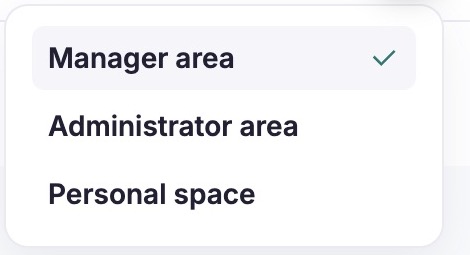
The check mark identifies the active manager workspace; Administrator area is an additional destination available to this authorized account. Select that destination only for platform-console work, or Personal space for your own profile. Observed in English on the separately authorized administrator account; not a proposed permission assignment.
Platform / project setup — legacy
Account spaces and starting destination
The inspected legacy dispatcher recognizes employee (ROLE_CUSTOMER), company/manager (ROLE_COMPANY) and administrator (ROLE_ADMIN, with super-admin handling) roles. The requested role must already be in the user's role list. The switch reorders that existing list and persists it, then redirects to the corresponding homepage. It does not add a new role. Do not configure a role by manually constructing switch URLs.
The V3 company Spaces menu derives destinations from existing roles; its manager/personal labels use tenant lexicon. A legacy platform-admin entry is conditional on the corresponding account role. Reordering the active role can influence the next root-page redirect; it is not guaranteed to be a tab-local display preference. Simultaneous browser tabs may therefore have different visible pages while sharing the account's state.
Theme and hybrid setup
Documented in Confluence: the SMR playbook, v3, 24 September 2026, treats Enable Redesign Theme (V3) and Enable new neobrain hybrid platform mode as separate platform setup steps, then distinguishes legacy menu visibility from SMR functional rights. This is platform-team configuration, not an employee instruction.
Verified in code: FeatureSwitchListener handles theme/hybrid activation; CompanyNavigationExtension and SmrDisplayService resolve whether a nextgen feature can be displayed. A modern theme alone does not establish space access or a populated nextgen homepage. No deployment flag value is inferred from a screenshot.
Customer / platform setup — homepage variants
All settings below are Verified in code as behavior dependencies; actual tenant defaults and accessible editor controls were Not verified. Use an authorized configuration surface or involve the platform owner; do not expose server changes as a client procedure.
| Area / key | Choices and effect | Dependencies and limits |
|---|---|---|
Manager module_acceuil_bo | Boolean; selects the newer company-home rendering versus the older default. | theme_v3-bo selects V3 presentation within that rendering. Neither creates manager entitlement. |
Manager notification_dashboard | Boolean; enables generation of the homepage activity feed. | Empty data is distinct from disabled feed; module/relationship data supplies the entries. |
| Manager actionable campaigns | V3 plus hybrid activation calls the todo provider. | Sources also require legacy review/People Review access; each source can fail or be omitted independently. |
Employee display_old_version_homepage_fo | Boolean; true retains the old employee homepage, false renders Home V2. | This is independent of nextgen admin/personal-space permissions. |
Employee theme_v2-homepage | Boolean; selects the themed V2 template from the V2 renderer. | Template composition differs from the alternative widget layout. |
| Employee offers card | offres AND (job_offer_internal OR job_offer_external). | Destination also depends on job_offer_theme_v2. An enabled card does not by itself prove every offer is accessible. |
| Alternative V2 widgets | hide_profile_suggestion_hp, hide_skills_suggestion_hp, home_rdvs, module_campagne_fo. | Apply to their inspected rendering branches. Do not promise identical widget effects in the themed template. |
| News | Content and audience come from the configured news data. | No homepage news editor or publish operation was inspected; use the established authorized content workflow. |
The themed V2 employee template includes profile enhancement and job discovery. Its discovery branch contains a literal true condition, so it must not be documented as reliably hidden by disabling metiers in that template. Discuss an absent/unwanted card with the platform owner rather than assuming all themes share one rule.
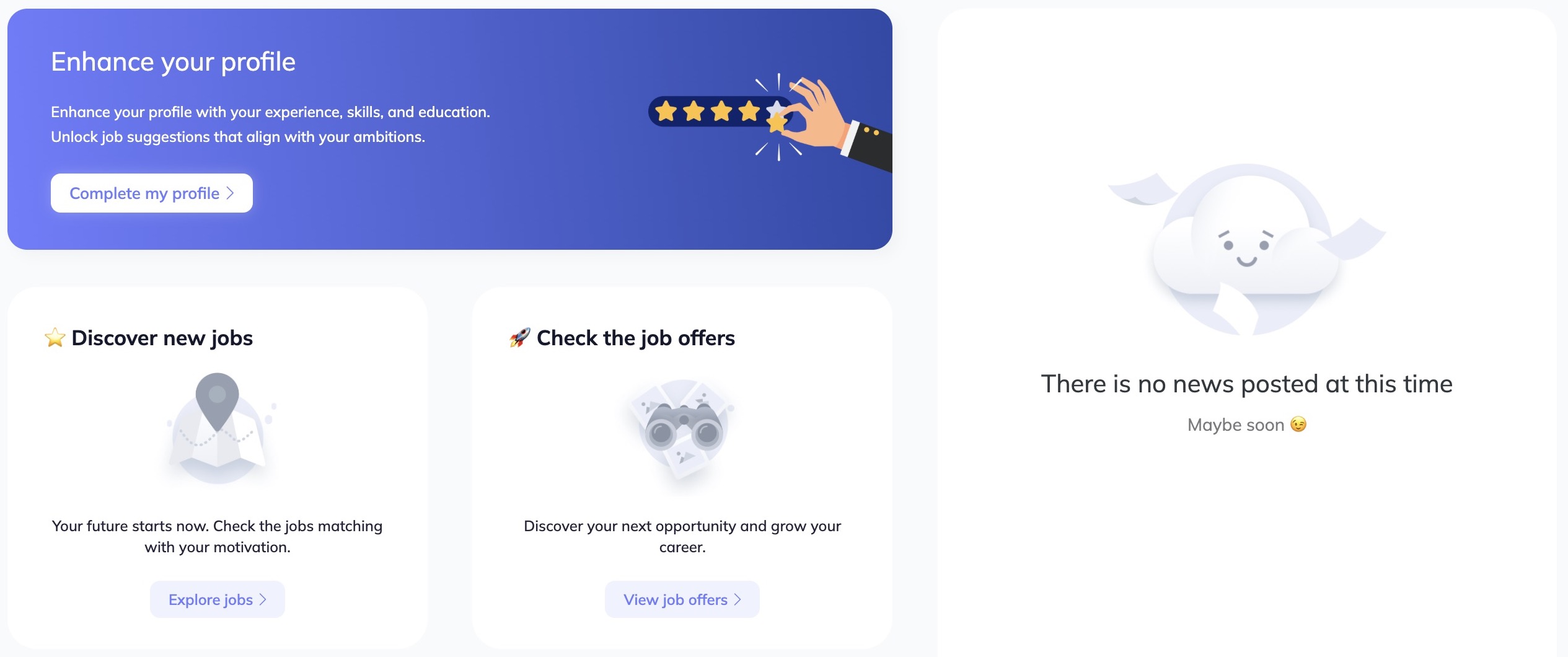
The homepage separates profile completion, job exploration and job offers from the news area. Choose the card for your activity; an empty news panel does not prevent access to the other cards. Observed in English: profile, job discovery, offers and empty news. This illustrates the selected template, not universal tenant defaults.
Nextgen customer administration — spaces and module access
Use the authorized role editor, with groups/users and visibility scopes, to arrange the intended experience. Space-access permissions are separate from module permissions:
| Permission | Effect verified in frontend | What it does not establish |
|---|---|---|
allow-personal-space | Shows Personal space and permits that route through the space guard. | Access to every personal module or another employee's records. |
allow-admin-space | Shows Admin space and permits that route through the space guard. | Legacy ROLE_ADMIN or cross-platform console access. |
| Module read/action permissions | Used to compose navigation and guard supported routes/actions. | An unlimited employee population; visibility and backend rules remain relevant. |
Backend migration Version20260512085559 registers the personal-space right for employee/manager presets and admin-space right for HR/admin presets. Those catalogue targets are not proof that a specific tenant has those assignments today. Do not run migrations or auto-configure roles merely to reproduce screenshots.
The frontend stores its admin-mode preference locally and updates it when switching, but router permission checks still apply. Standalone admin/personal Home resolves to an empty component in the inspected source; no settings form that adds dashboard cards there was established. Prefer the verified legacy/hybrid homepage journey when describing the current deployed user experience.
Privileged platform administrator scope
The /admin/ dashboard lists only platform settings assigned to its Admin record. Its Type/Search controls filter that list; they do not assign platform access. Changes to that authorization are platform-owned and are outside ordinary tenant-role configuration.

Direct access shows a platform-name search and Type filter above the table headings. These controls narrow the authorized platform list; they are separate from employee search and do not grant access to a platform. Observed, original administrator session, English. Client rows and account identity excluded. No platform entitlement was changed.
Validation, rollout and troubleshooting
After an authorized change, validate the same user through the actual shell and module. Check active-space indicator, destination, menu visibility, module read/write access, employee population and homepage empty states separately. Use the smallest representative change in the normal test/release process. Switching to another space is reversible navigation; reverting theme/space configuration is not established as an automatic rollback of role/group changes.
| Symptom | Check |
|---|---|
| Missing switch | Multiple existing legacy roles, account records, or nextgen space entitlement in the relevant shell. |
| Menu visible but forbidden | Legacy display conditions, nextgen permissions and endpoint authorization separately. |
| Missing campaign card | V3/hybrid setup, source access and source API availability. A zero card and a hidden card have different meanings. |
| Different employee homepage | Old/V2/theme branch, content and module dependencies. |
| Empty standalone nextgen landing | Inspected Home component, not proof of a failed legacy homepage or absent role. |
| Unexpected labels | Locale, tenant lexicon and implementation generation. |
Evidence and limitations
Observed in application: English/French manager and employee spaces, authorized original-account administrator area, homepage content and the test account's denied Configuration access on 23 October 2026. No rights, theme flags, content, modules or business settings were saved.
Verified in code: legacy dispatcher and company/customer/admin HomeBundle controllers/templates, V3 top layout, FeatureSwitchListener, CompanyNavigationExtension, SmrDisplayService; nextgen frontend NavigationHeader.vue, navigationModule.store.ts, router guards; backend src/Infrastructure/Migrations/Version20260512085559.php. See Technical for precise source mapping.
Documented in Confluence: SMR playbook, v3, 24 September 2026; SM redesign working notes, v22, 8 June 2026. The supplied PS methodology, v7, 30 December 2025, onboarding, v9, 18 February 2026, and KBCT FAQ folder were reviewed earlier as context, not homepage-setting contracts.
Not verified / missing captures: authorized tenant homepage-setting editors, live nextgen standalone landing screens, actual flag defaults, all widget variants, mobile navigation, change propagation timing and configuration rollback. No administrator editor was fabricated from a manager view.
Last updated on 3 November 2026