Import and export — configuration guide
This guide is for administrators preparing access, reference data and controlled imports/exports. Both centers are legacy-only. A current navigation shell does not make their configuration nextgen. Daily operations are in the functional guide; routes and processing are in the technical guide.
Ownership and implementation matrix
| Owner / scope | Legacy | Nextgen |
|---|---|---|
| Project / platform team | Tenant feature activation, background processing, media storage, upload limits and mail delivery. | No equivalent center setup in scope. |
| Customer administrator | Authorized role permissions, eligible reference data/fields, upload-specific mapping and campaign selection. Some tasks require platform-team assistance. | No equivalent center configuration screen established. |
The centers do not have a verified common “save configuration” form. Feature activation, role access, reference-data setup and per-upload choices are separate layers. Do not assume granting export access also grants imports, or that hiding a menu undoes previously imported data.
Customer administrator — prerequisites and access
- Confirm that the platform team has enabled the intended center for your company.
- In your authorized role administration process, review the role's import/export access. Use Roles and permissions for that process; do not give employees access merely to correct their own profile.
- Verify the intended account in the manager workspace. Open Settings → Import Center or Settings → Export Center.
- For campaign exports, verify access to the relevant performance module and that company campaigns exist. Center access alone does not make all module tabs appear.
- Check that reference catalogues, language and Smart Editor definitions are ready before accepting a file.
Observed in application, 16 October 2026: both centers accessible in the test manager/admin context. No role grant or platform setting was changed. Verified in code: the access rules below; actual tenant values cannot be deduced from repository defaults.
| Control | Allowed value / baseline | Scope and effect |
|---|---|---|
| Import access permission | Legacy role key import_center_access; Boolean grant. Default role file has false for admin_rh, hrbp and manager. | Import view, import and delete voter attributes currently share the same underlying access condition. It is not a separately verified read-only role. Master-school access has special handling. |
| Data Management access | data_management_access, false in the same default role file. | The 2025 PS guides list it as an additional navigation prerequisite. The current inspected menu is Settings; the ImportCenterVoter itself does not test this key. Have the platform team confirm the deployed navigation requirements. |
| Export access permission | Legacy role key export_center; granted role or the controller's no-custom-permission path. | Allows entry only when the export feature is also enabled. It is separate from import access. |
| 1to1 visibility | module_interview_view permission and module_interview_bo feature. | Makes the tab eligible; the controller also requires company interviews to populate it. |
| People Review visibility | review_access permission and module_review_bo feature. | Makes the tab eligible; the controller also requires company reviews. |
Keys are included here to help administrators identify the requested entitlement with their platform team. They are not instructions to edit server files.
Customer administrator — prepare the import contract
Languages, repositories and fields
Prepare one upload for the intended language/repository combination where applicable. The matching controller obtains languages from the company's configured language list and restricts repository selection to company repositories marked public. A language choice affects the import's data/translation; it does not change your interface language.
| Import family | Upload choices and preparation |
|---|---|
| Skills / Jobs | Required title and code; company language and repository. Keep codes stable for intended updates. Prepare referenced groups and catalogue values first. |
| Jobs&Skills | Required skill code, job code, proficiency and importance; repository. Create the linked reference records first. |
| Users | Required civility, first name, last name, email; company language and data-protection acknowledgement. Confirm email-based create/update behavior before applying. |
| Formations / Formations&Skills | Company language; training–skill links also require a repository. Prepare training/skill references and follow their type-specific required indicators. |
| Campaigns | Campaign type selector when applicable; prepare the referenced campaigns and users. |
| Users&Skills | Required email, skill code, note; repository. Prepare users and skills. |
| Jobs Offers / Hierarchical Relationships / Visibility groups | Use the dedicated type and its own mapping/schema. They are not aliases for the Users or Jobs import. |
| Interview Answers | Select the target interview at upload; fields are generated from that interview. Verify the campaign structure before preparing data. |
Verified in code: MatchController::indexAction/updateAction, AdapterFactory::IMPORT_TYPES and the import DTOs. This table is a preparation checklist, not an exhaustive file specification for every type.
Existing Smart Editor fields can appear as mapping targets; the Import Center does not create their definitions. The checked matching controller includes visible eligible fields for the selected entity. Users and trainings restrict supported custom types to date, HTML, translatable HTML, select, text and translatable text. Job/job-offer custom-field selection uses its own conditions. Default user fields are translated through UserRow::DEFAULT_SE_FIELDS_MAP, so some available labels depend on Smart Editor definitions.
For text that must differ by language, prepare a translatable field. Documented in Confluence: ordinary text/HTML fields share one value across languages; translatable fields allow language-specific values. Confirm the chosen field definition before import rather than assuming the interface language isolates its stored value.
Per-upload options and defaults
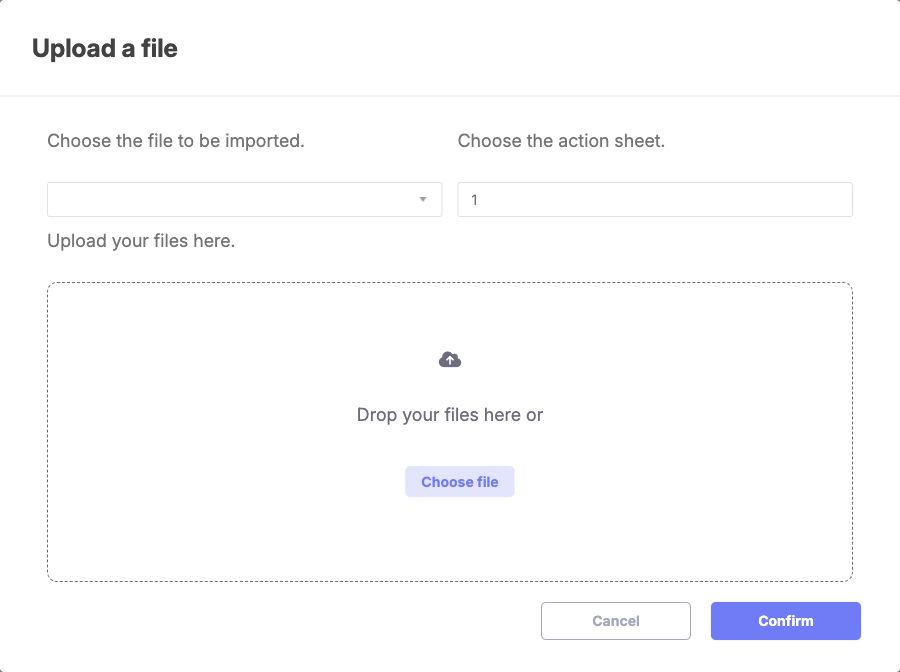
The upload dialog separates import type, worksheet number and file selection. Choose the type and source file before confirming; the blank file area shows preparation, not a completed upload or import. English manager/admin context, 16 October 2026. Type starts blank and worksheet starts at 1. This dialog configures one upload, not the tenant.
| Setting | Values / initial state | Dependency and effect |
|---|---|---|
| Import type | One of the 12 types listed in the functional guide; blank initially. | Determines adapter, mapping fields and validation. Choose before uploading. |
| Worksheet | Numeric position, 1 initially. | One sheet per upload. Unsupported positions fall back to the first sheet in code; check the intended sheet explicitly. |
| File | One nonempty CSV/XLS/XLSX; none initially. | Client checks MIME type and a dynamically rendered maximum size. Do not assume a universal MB limit. |
| Interview choice | One company interview; blank initially, only for Interview Answers. | Required before that upload can proceed. |
| Matching language / repository | Company-defined lists; deployed default not verified. | A submitted value must belong to the allowed set for the import. |
| Destination mapping | Source column to supported target field; blank or restored per upload. | Maps only selected data. Review before validation; duplicate targets can overwrite earlier mapping entries. |
| Users acknowledgement | Required checkbox. | Blocks matching if absent. |
Canceling/reopening the upload dialog resets the file and type. It is not a rollback of an existing upload or a business-data change.
User-import columns with broader effects
Treat these optional mappings as deliberate administrator decisions, separate from identity-only corrections. Verified in code: UserRow constants and UsersService::getUserRowAsUser/persistImportCenterRowDto.
| Destination | Allowed values / meaning | Review before use |
|---|---|---|
| Civility | 1 / 2 in the checked schema. Required. | Follow the current import schema; other representations are not established. |
Active state (enabled) | 1 / 0, also Boolean values in the DTO. | Can change account availability; do not infer “unchanged” from an omitted field without validating the particular update path. |
Send identifiers (sendIdentifiers) | 1 means send; blank means do not send in the schema. | Can trigger a login-details message; do not enable during a data-only correction without reviewing the intended communication. |
| Role | Role identifier supported by the import mapping. | Can affect access; validate the destination role and ownership with the authorized administrator. |
| Job / default Smart Editor job | Job mapping and the code-based default job field are distinct. | Read the field hint and use the expected existing reference. |
Other optional user mappings include contact/address details, employee identifier, position, organizational fields, dates, contract and company status. A company status field is distinct from account active state. The complete supported field names are defined by UserRow::IMPORT_FIELDS plus eligible Smart Editor fields; do not treat this guide as permission to import every available personal field.
Customer administrator — campaign export preparation
Choose the module, narrow campaigns, review checked rows and request an export as described in the functional guide. Export selection is per table. The header checkbox applies to all filtered rows, including other pages; changes to filters can hide checked rows. Clear filters and review selection before another request.
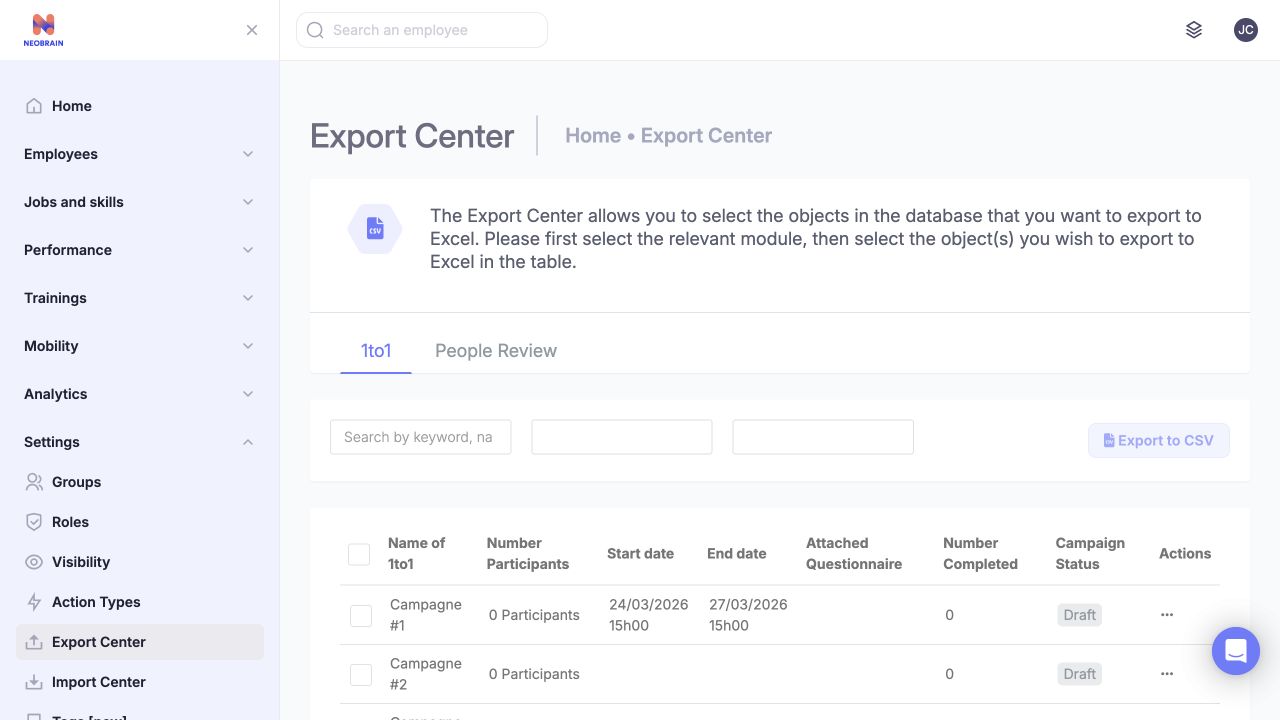
The module tabs and campaign checkboxes define the export scope. Review the selected module and rows before requesting files; the two narrow filter boxes are unlabeled in this captured state. English UI, 16 October 2026. Module access and company campaigns determine which tabs appear. No export was run.
The inspected page has no verified schedule, destination, delimiter, retention or format-setting form. Its button says CSV, while the checked campaign generators create XLSX and the download controller returns ZIP. Ask the platform team to confirm delivery if the generated result is missing; the initial processing message is not completion evidence.
Platform-team reference — legacy setup
These are code-derived dependencies for the platform team. Customer administrators should request activation through the normal support process.
| Dependency | Code-defined baseline | Validation and ownership |
|---|---|---|
import_center_access feature | config/configuration/feature_module.yml, Advanced Reporting, baseline false. | Platform team enables for the intended tenant; role permission is still separate. |
export_center_menu_display feature | Same file/area, baseline true. | Platform team verifies effective tenant/module access. This baseline does not establish runtime access. |
| Import workers | Parse, validate and import commands are submitted through CommandTaskRepository::push. | Check task consumption and failed-stage events. A transferred file can remain pending if processing is unavailable. |
| Export workers | Controller starts background PHP commands for 1to1/People Review. | Verify supported runtime, process execution, workbook generation and mail delivery. This is a separate execution path from the import task queue. |
| Media and upload handling | Writable transient import location, configured media validation/limits; export files use private media. | Platform team owns storage, process permissions and cleanup policy. No retention duration was verified. |
| Reference data | Company languages, public repositories, eligible Smart Editor fields, users and campaign structures. | Customer/domain administrator supplies intended values; platform team confirms availability where needed. |
Rollout and safe change
Verify access and reference data before processing a small approved sample. Review matching and invalid rows, then confirm results in the business screens. Preserve source data and reports needed for reconciliation before increasing volume. These are recommended operational checks, not observations of an executed import.
Revoke the relevant grant or deactivate the center through the authorized administration process to remove future access. This does not reverse completed writes or revoke copies of files already downloaded. There is no verified automatic rollback for a completed or partial import; correction requires a reviewed follow-up operation based on what actually changed.
Validation and troubleshooting
| Problem | Administrator check |
|---|---|
| Menu missing despite role | Effective tenant feature, legacy permission, workspace and navigation prerequisites. |
| Export module absent | Module permission + feature + company campaigns. |
| Custom field not in matching | Entity/property, visibility, supported field type, default-field map and selected import type. |
| Language / repository rejected | Select a company language and eligible public repository for this upload; do not send arbitrary IDs. |
| Parsing truncates input | Continuous headers and rows, correct worksheet, genuine spreadsheet format. |
| Validation fails | Required mappings, type constraints, reference values and Users acknowledgement. |
| Partial import / interrupted job | Reconcile imported rows and existing records before retrying. Deleting history does not restore business data. |
| Processing/email never finishes | Ask platform support to inspect the appropriate queue/process, storage and mail delivery. |
Evidence and limitations
- Observed in application: English/French centers and upload controls on
smartmobility.io, 16 October 2026, authorized manager/admin context. Role administration, feature-switch screens and infrastructure configuration were not changed or captured. - Verified in code: legacy
config/configuration/{feature_module,default_permission}.yml,ImportCenterVoter, both center controllers, matching DTOs, import commands and export generators. Source map in the technical guide. - Documented in Confluence: PS Users, Jobs, Skills, Job&Skills, version 2, updated 29 April 2025. Their access instructions describe Advanced Reporting activation and older Data Management navigation; the observed entry point is Settings. Current code determines fields and defaults used here.
- The supplied KBCT page returned 404. Delivery Philosophy & Project Methodology (v7, 30 December 2025) and Onboarding/learning and partner certification (v9, 18 February 2026) were read; neither specifies center settings.
- Not verified: effective production overrides, screenshot coverage of platform switches/role settings, universal upload-size limits, retention rules, end-to-end import/export results and any nextgen replacement. Configuration ownership does not imply that every customer-admin role can grant permissions itself.
Last updated on 3 November 2026