People Review — legacy configuration guide
Legacy — platform-team reference
- Establish module/menu access and the appropriate role rights. Legacy code uses
review_all,review_createandcan_review_himself; the documentation also identifies access and preparation-unlock rights. Exact keys for the latter are not asserted here. - Create the employee relationships required for the process. Define direct-manager, HR or other evaluator links as appropriate, then populate them on the reviewed employee profiles through authorized administration or the user-data feed.
- Verify the relationship data and campaign visibility selection together. An unpopulated relationship produces no corresponding employee/reviewer link.
- Review the intended global rights separately from campaign assignments. Broad review visibility is organization-wide and materially differs from checking Administrator for one reviewer in one campaign.
This sequence is Documented in Confluence in Handle visibility rules in a People Review, v5, modified 21 May 2026; relationship resolution is Verified in code in UsersRelationsReview.
Legacy — customer-administrator procedure
1. Define a People Review questionnaire
Documented in Confluence: Playbook - People Review, v7, modified 8 August 2023.
Open Questionnaires > Create, select the People Review questionnaire type, and define the form's information and questions. Prepare translations before launch. The template catalogue is not the nextgen Review Campaign form model.
| Question family | Configuration and downstream effect |
|---|---|
| Section / message | Organizes the questionnaire or supplies explanatory content. |
| Simple / open text | Short or multiline response. The playbook distinguishes their text capacity; current universal character limits were not verified. |
| Selection / choice | Define choices and whether one or several can be selected. Matrix-driving performance/potential questions require consistent ordered choices. |
| Rating | Configure the rating scale and display. The 2023 playbook documents a maximum of six; current deployed limits were not verified. |
| Profile completion | Select employee profile information to display. This is a data-display choice, not a new employee answer. |
| 1-to-1 | Display selected interview information; the campaign must link the appropriate annual interview campaign. |
| Collective review | Configure matrix axes from the selection questions. |
| Succession / collective succession | Include successor selection or collective succession information where in scope. |
For every question, decide whether it belongs in generated PDFs. Questionnaire > question menu > PDF visibility is the documented control. Hiding it also hides its associated answers in the output. It does not revoke on-screen review access.
Documented in Confluence: People Review - Form Visibility, v3, modified 7 August 2023. The PDF template also checks question.managerpermission. The equivalence between every UI option and this stored field was not separately traced. Avoid changing answered questionnaires; the guidance documents possible loss of existing responses.
2. Configure the campaign and employee population
Open People Review, choose the creation action and complete campaign information: name, description, draft/published status, start/end dates and the selected questionnaire. Link the annual interview campaign if using 1-to-1 questions. The playbook advises leaving its session selection empty for its standard process; this is a documented deployment convention, not a universal validation rule.
Observed in application and Verified in code: the legacy creation entry immediately persists a draft before the information form is saved (DefaultController::newAction). Opening it is a data-creation action; use an existing draft for inspection. The code initializes direct-manager visibility and draft status.
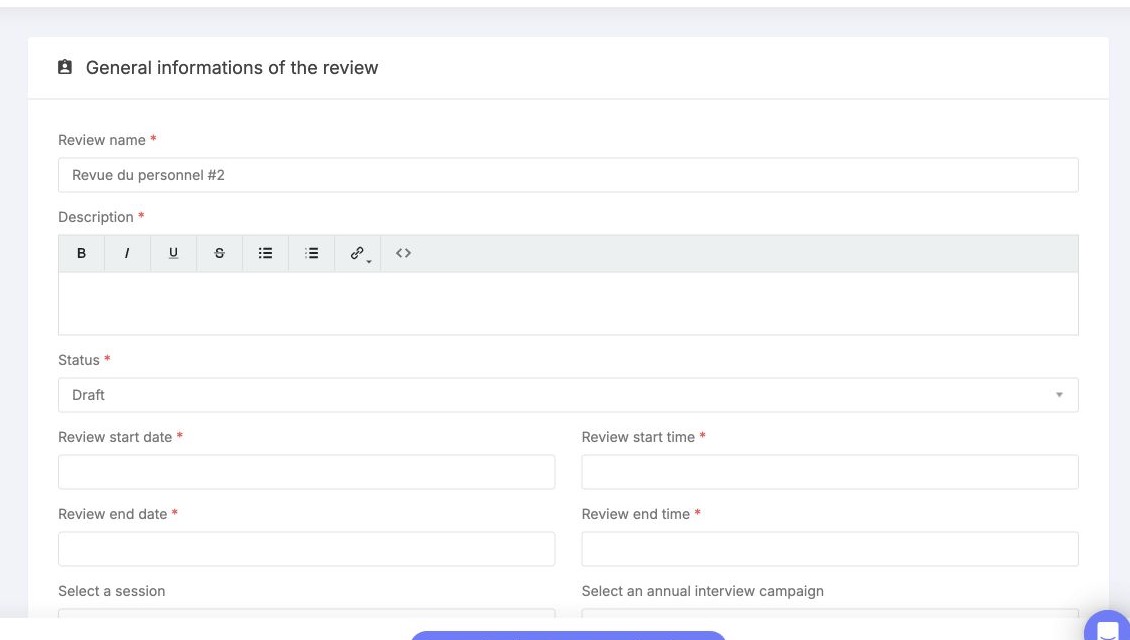
The legacy campaign form groups its name, description, publication status and review dates. Review these fields before saving and continue to the lower configuration; a Draft value is separate from a completed review.
Select which relationships give access, then add the employees being reviewed. Reviewers are prefilled from these relationships on those employees. Review the resulting reviewers before publication.
| Setting | Allowed values / scope | Visibility consequence |
|---|---|---|
| Campaign relationships | Direct manager and configured relationship types | Ordinary reviewer employee scope is based on these selected links. |
| Reviewed employees | Campaign population selected by the administrator | Determines whose review data exists in this campaign; being selected does not grant self-access. |
| Reviewer | Person participating as reviewer | Campaign participation; normal list population remains relationship-derived. |
| Reviewer Administrator | Per-reviewer checkbox | Expands that reviewer's visibility to all campaign employees and enables collective review. Default checkbox state was not verified. |
| See all the reviews | Global role right | Broad visibility across campaigns, separate from reviewer-admin membership. |
| Create a Review | Global role right | Creation/editing entitlement in the documented process, separate from read scope. |
| Self-review | Separate role right | Affects the reviewer's own row in restricted paths; not a universal employee portal permission. |
| PDF visibility | Per questionnaire question | Controls generated PDF content; independent of campaign/employee scope. |
Example, illustrative: to let managers assess their own assigned teams and HR calibrate the entire campaign, configure manager relationships, verify employee links and leave ordinary managers without campaign Administrator. Add the intended HR reviewers as campaign administrators. Check broader role rights do not unintentionally expand managers' populations.
3. Validate before publishing
Test an ordinary reviewer, a campaign administrator, an unrelated reviewer and a reviewed employee. Check the campaign list, employee rows, individual form, collective review and PDFs separately. The legacy controllers do not express identical authorization conditions, so list filtering alone is insufficient evidence of end-to-end confidentiality.
Before launch, finish questionnaire and PDF choices, check relationship data and confirm the population. For later changes, assess existing responses and use an approved change process; no automatic safe rollback or questionnaire migration is established here.
Last updated on 3 November 2026