Forms — legacy configuration guide
Customer administrator — legacy
Access and initial setup
Open Performance → Questionnaires using a role with questionnaire access. The Interview playbook describes Create → 1 to 1 → Select for interview questionnaires. Creating/copying a questionnaire changes stored data; open an existing form for inspection instead of creating a disposable draft on production.
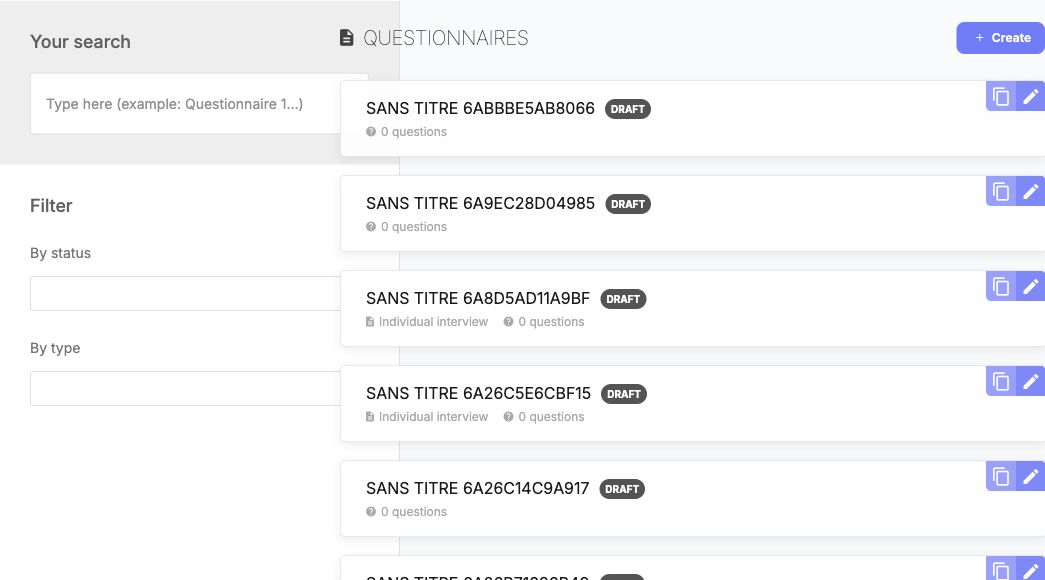
Use the title, status and type criteria to locate the intended questionnaire. Copying creates a separate stored questionnaire; it is not a preview.
Structure, questions and access
| Setting | Values / dependency | Administrator task and effect |
|---|---|---|
| Form information / status | Title, content and available legacy statuses. Library exposes Draft, Published and Archive. | Use a clear versioned title and finish content before selecting it in a campaign. Status changes are persistent. |
| Section / message | Section headings and explanatory content. | Organize the journey; these are not answer-bearing questions themselves. |
| Simple / open text | Short/single-line and multiline legacy families. | Choose according to the expected response. The old playbook's text-limit advice is documentary guidance, not a verified universal validation rule. |
| Select / choice | Configured options and single/multiple-answer behavior. | Define meaningful labels and permitted answer counts. “Not filled” is a documented optional select choice, not automatically a valid required answer. |
| Rating | Scale and display. | Review bounds and labels. The 2023 playbook recommends a scale up to 6; it does not establish current nextgen or universal server limits. |
| Objectives | Previous/future evaluation questions and applicable periods. | Prepare periods before campaign setup. The answers can reference goal records rather than a scalar field. |
| Skills / specialized questions | Available according to type and activation. | Verify skills, target levels and relevant profile/referential data. Do not assume People Review-specific matrix/succession questions belong in a 1-to-1. |
| Employee / manager access | Documentary examples distinguish no access, reading and reading/writing. | Configure and test each persona separately. Do not infer that both can edit every question. |
| Languages | Authored questionnaire translations. | Translate question titles, instructions and options. Changing UI language does not translate authored content. |
The legacy table question is documented but discouraged by the playbook; its actual availability also depends on activation. Preserve existing answered forms until their dependencies have been reviewed. Use a separate approved version for future campaigns rather than assuming edits safely update past answers.
Save and reopen a legacy draft
An authorized manager can prepare a reusable form without publishing it or assigning employees.
- Open Performance → Questionnaires → Créer.
- Choose an available form family. Support entretien was used for this example.
- In the settings tab, enter Nom du questionnaire and the optional description. Keep Statut du questionnaire → Brouillon, then choose Enregistrer.
- In the Questions tab, choose Ajouter une question → Question ouverte. Enter the question title, select Champ obligatoire when intended, then choose Nouveau.
- Reopen the questionnaire. Check its saved title, description, type and draft status.
- In the Questions tab, open the question’s … → Éditer menu. Check that the title and required checkbox remain; use Annuler to leave inspection without changing the question.
Application example: an unpublished legacy draft retained its title, description and Support entretien type after reopening. Its open question retained the required setting. It was not assigned to a campaign. The legacy Tests type could not be confirmed as saved.
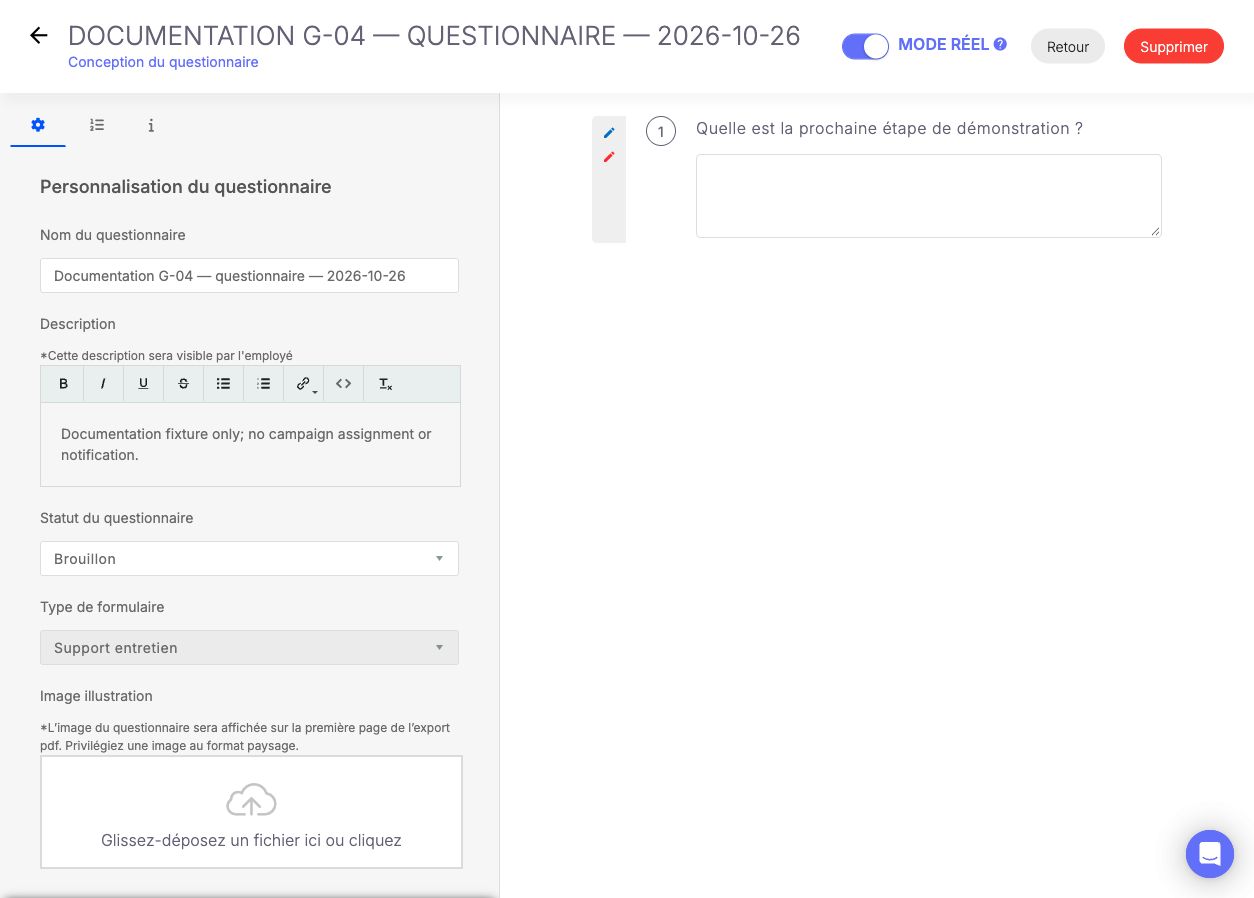
The reopened draft retains its name, description, Brouillon status and Support entretien type. The question preview is form content, not a submitted employee answer.
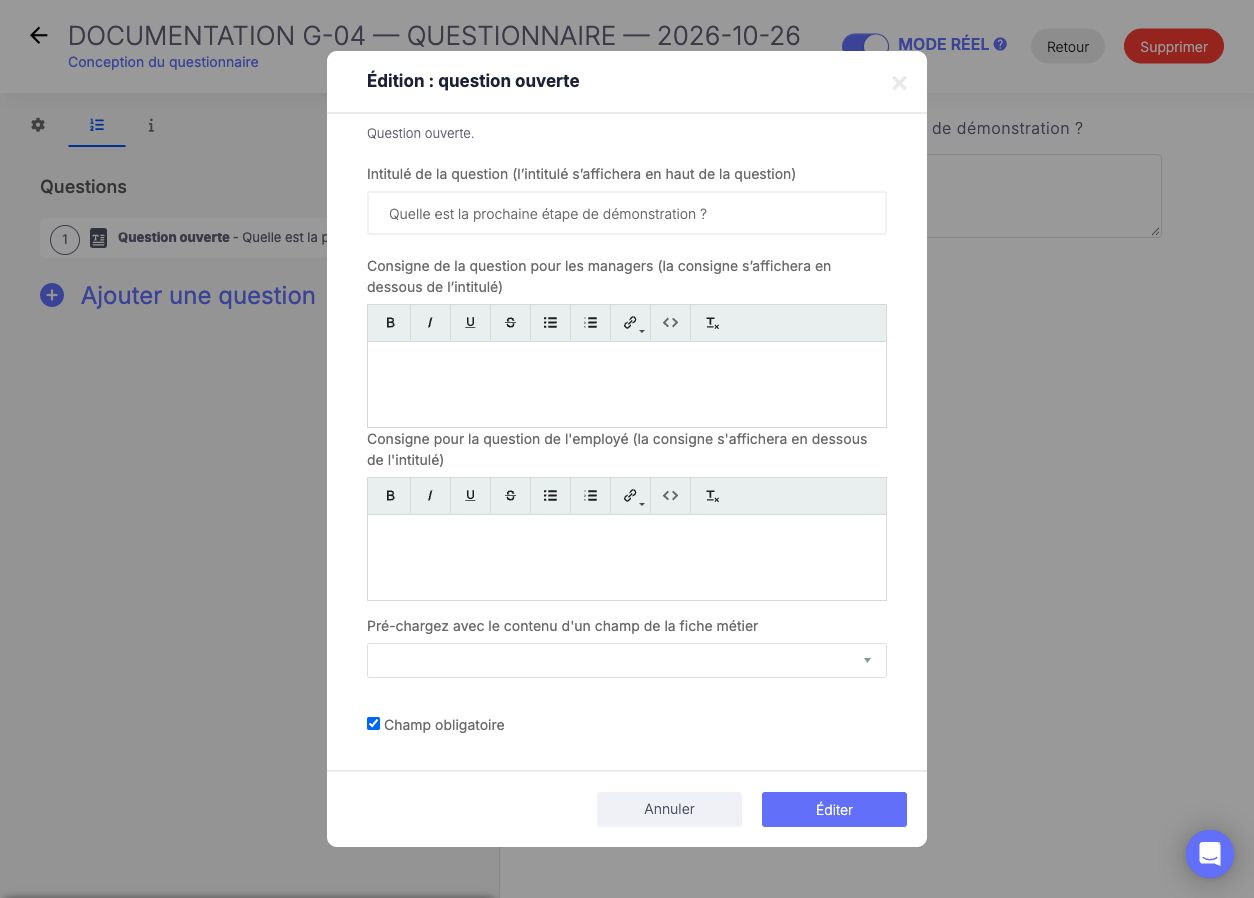
The reopened question editor retains its title and the checked Champ obligatoire option. This verifies question configuration; respondent-side validation still requires an assigned campaign.
Last updated on 3 November 2026