Self-assessment — configuration guide
For administrators setting up the legacy skill self-declaration campaign. Daily usage is in Functional; technical contracts are in Technical.
Ownership, prerequisites and access
The platform team controls tenant feature activation and role design. Authorized customer administrators configure campaign information, steps, population and planned notifications. Employees and their managers must have enabled accounts, appropriate organizational links and a usable skill framework.
Observed in application, 25 October 2026: PS Testing 2026 exposes Jobs and skills → Self-declaration in Jim Carter's Manager area. Self-assessment is the documentation's Performance menu name. Creation is available in this account; other roles were not tested.
Verified in code: the legacy navigation requires campagneAutoDeclaration and either campaign_create or the legacy empty-permission fallback. This is a navigation condition, not proof of the complete endpoint authorization policy.
Create and configure a draft
- Open Jobs and skills → Self-declaration and select + Self-declaration. Observed in application / Verified in code: opening the action creates a persisted draft immediately. Cancel does not establish that the draft has been removed.
- In Informations, enter a campaign name and description, and set the start/end date and hour. Keep Draft while preparing the campaign. Save and exit persists the form; Continue to the steps saves and opens the next section.
- If Evaluation mode is available, choose profile skills or job skills. For job mode, choose an active job from the tenant. PS Testing did not show this selector, so this part is Verified in code, not live validation.
- Decide whether to enable Update employee profile skills after manager feedback sharing. It was checked on the newly created PS Testing draft. Review the profile effects below before changing it.
- Open steps, then Add a step. Enter its name, type, note to the employee, description and end date. Save the step and persist the sequence. Configure steps before adding employees: enrollment initializes each participant at order 1.
- Open Participants, use Adding participants, and select only the intended population. Confirm the resulting list. The inspected documentation draft remained empty.
- Open Planification / Continue to planning. Schedule an email opens planned communication; verify recipient, content, date/time and any step/completion condition before saving. No notification was scheduled during verification.
- Review campaign information, population, dates, sequence and profile-update behavior. Change status to Published only when ready to launch. A published campaign becomes available to assigned employees during its date window; reaching the wizard's end alone does not prove launch.
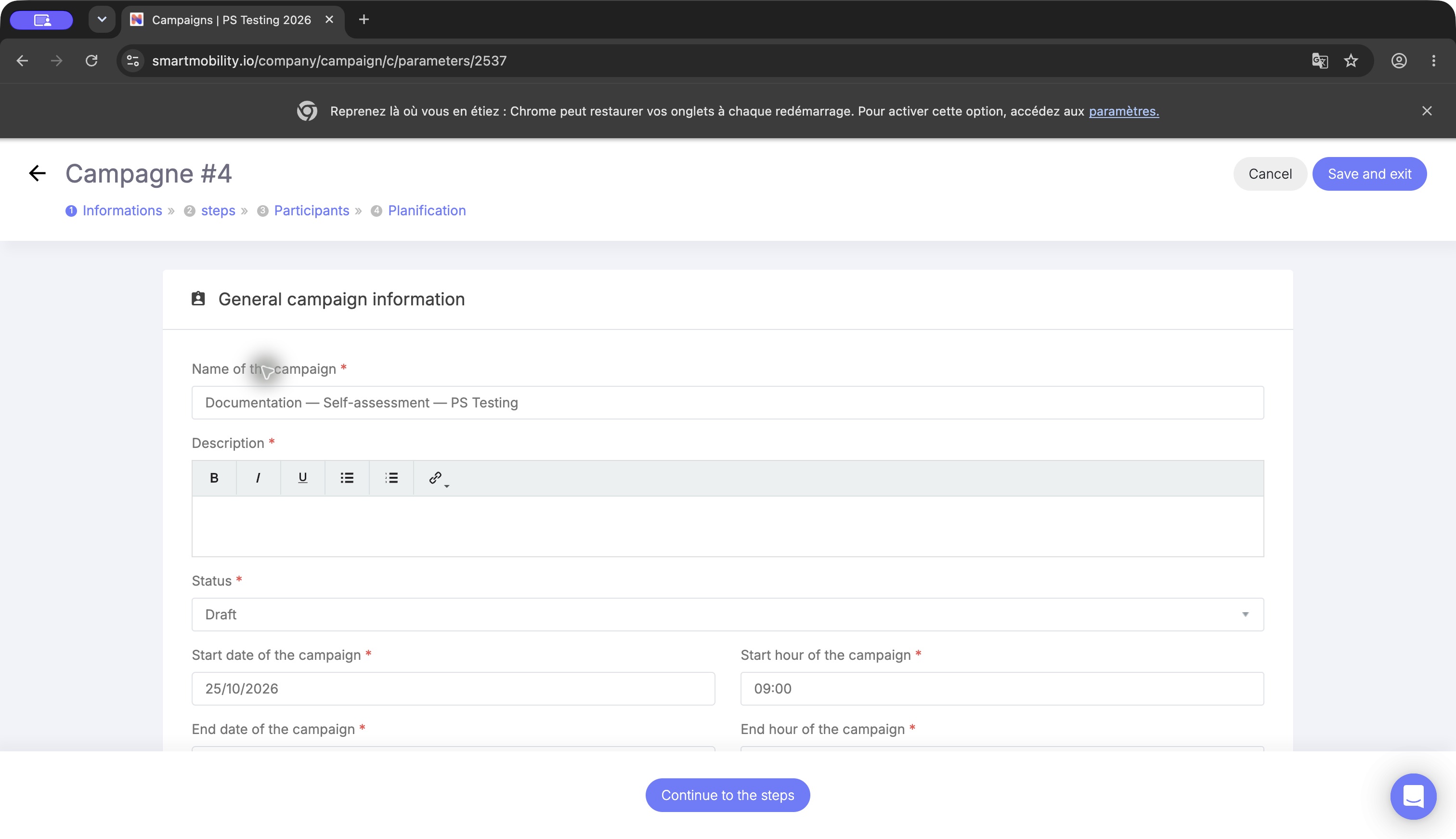
The self-declaration information form shows the draft’s name, description, status and dates. Review the fields and continue to the step setup; opening or saving a draft does not launch an employee assessment. Observed in application: information form of a test draft, before saving. The cursor highlights the name area; lower fields may require scrolling within the full window.
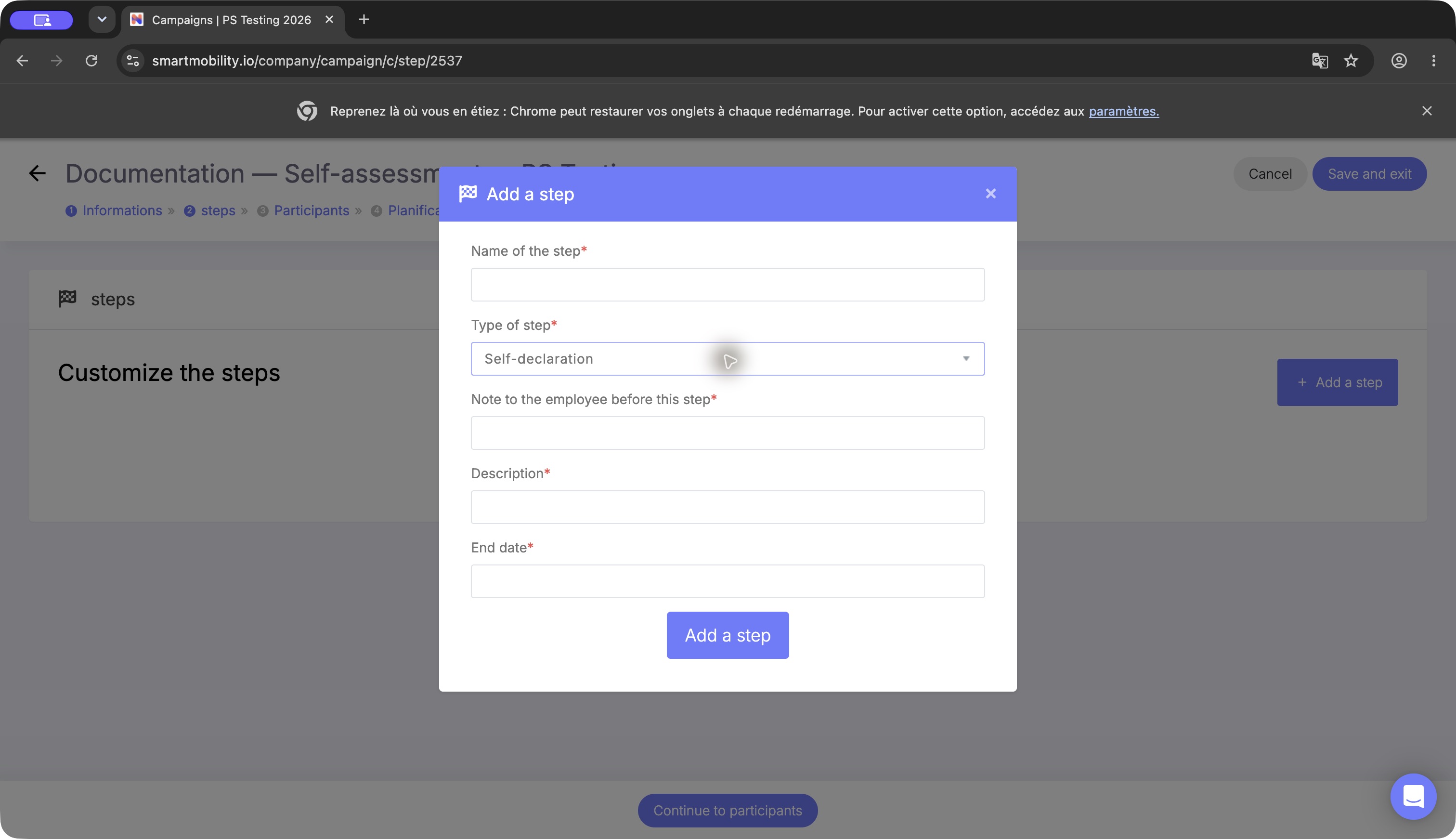
The Add a step dialog shows the selected step type with name, associated job, description and deadline fields. Choose the type for the intended campaign sequence before adding it; the open dialog is not an added step. Observed in application: default Self-declaration type. No step was added to the documentation draft.
Fields, defaults and scope
Unless stated otherwise, the table is Verified in code in the legacy campaign controller, entity, mapping and templates.
| Field / setting | Values, scope and behavior |
|---|---|
| Name, description | Campaign-specific. The UI marks both required and checks for empty values. |
| Status | UI offers Draft and Published, stored as brouillon and publiée. New campaigns start as draft. List time tabs are not additional stored publication values. |
| Start/end date and hour | UI checks non-empty date/hour fields; controller parses d/m/Y H:i. Confirm chronological order and runtime timezone; no universal customer timezone rule was established. |
| Assessment mode | Profile = 1 by default; Job = 2 when auto_evaluation_with_job_skills is enabled. Saving with the switch disabled resets mode to Profile and clears the selected job. |
| Assessment job | Required for Job mode. Must be an active job belonging to the current setting; an invalid choice is rejected. This is one campaign-wide job, not each employee's own job. |
| Completion-time profile update | New entity initializes true, and the PS Testing draft was checked. The mapping declares a database default of false; existing records and migrations must be inspected rather than assuming one universal default. Omitted update input is treated as false by the controller. |
| Step | Name, type, instructions, description, end date and numeric order are stored per campaign. Step start is copied from the campaign start when saved. |
| Participants | Per-campaign completion records. Incremental addition selects enabled same-tenant users and skips existing members; the add handler also has an end-date precondition. |
| Motivation visibility | hide_motivation_campaign_bo_fo hides the motivation column in the employee assessment template. Actual deployed switch value was not inspected. |
| Skill scale | Read from tenant skillLevel; do not hard-code a universal maximum. |
| Planned email | Campaign-scoped schedule, recipient and optional step/completion conditions. Scheduled processing requires a published campaign and the mail runtime. |
Step types and dependency order
Observed in application: the selector lists Self-declaration, Share manager, Assessment Manager, Face to face exchange. Verified in code: these correspond to legacy semantic types, with employee sharing targeting manager assessment and final completion handled separately. Do not freely replace semantic types with custom labels or assume dragging any sequence preserves progression.
Recommended setup — Inferred from code dependencies: put a self-declaration step first, include the manager-assessment type expected after employee sharing, and verify the subsequent manager/exchange journey in a test campaign before launch. The documentation draft was used only to inspect the editor; a complete configured progression was not exercised.
Profile update and safe changes
The checkbox controls the completion-time application of campaign history. It does not disable all profile writes:
- Profile mode — Verified in code: employee level and motivation changes can save directly to profile skills during assessment. Sharing also saves profile values. Skill removal acts on the profile record.
- Job mode — Verified in code: sharing writes job-skill campaign history. With the completion update enabled, existing profile skills receive manager level where available, otherwise employee level; a missing profile skill is inserted only when manager level exists. Employee motivation is copied when present.
- Turning the checkbox off later does not undo earlier profile writes. Returning a campaign to Draft does not restore previous skill values or retract delivered messages. No automatic rollback was established.
Prepare a new draft to change assessment mode, job or step structure after a campaign has started, rather than assuming existing history will be migrated. This is Inferred safe-change guidance, not an implemented migration feature. Inspect dependent participant records before changing steps or population.
Activation and verification checklist
Before launch, verify as representative authorized employee and manager: campaign visibility in the intended date window, correct skill population and scale, employee-to-manager progression, manager feedback, final profile behavior and recipients. Verify both a normal and an empty skill population. Publication, actual sharing and mail delivery were Not verified in PS Testing for this documentation.
| Problem | Diagnostic |
|---|---|
| Job mode missing | Confirm tenant feature availability. It was absent in the inspected PS Testing form; do not substitute a nextgen interview setting. |
| Job required error | Choose a valid active same-tenant job. Controller message: Job is required on current assessment mode. |
| Required-fields warning | Complete name, description and all date/hour inputs; select a job if mode requires it. |
| Employee cannot start | Verify publication, membership, date window and initial step. |
| No participants selected yet | Add the intended enabled population only after configuring the initial step. |
| No notification scheduled | This is the observed empty state, not a failed campaign save. Configure planned mail only when required. |
| Mail absent after a successful action | Check template configuration, relationships, scheduled processing and mail delivery separately. |
Legacy versus redesign
This setup belongs to legacy AssessmentCampaign. Redesigned interview campaigns use their own forms, reviewers and lifecycle. No automatic inheritance, configuration precedence or migration between these implementations was verified. Interviews configuration covers that separate capability.
Evidence and limitations
Observed in application: PS Testing 2026, Jim Carter, 25 October 2026, English manager wizard. A named draft was saved with no participants, steps or scheduled notifications and was not published. Screenshots retain the full application window.
Verified in code: smartmobility-legacy/src/Company/CampaignBundle/Controller/DefaultController.php; its Resources/views/Default/{parameters,steps,users,notification}.html.twig and routing; src/Main/ConfigBundle/Entity/AssessmentCampaign.php; src/Main/ConfigBundle/Resources/config/doctrine/AssessmentCampaign.orm.yml; src/Enum/Assessment/AutoAssessmentMode.php; app/Resources/views/core_company_theme_v3.html.twig; src/Service/Skills/SkillCampaignService.php; src/Command/Notifications/EmailProgramationCampaignCommand.php.
Not verified: tenant switch administration, complete role matrix, published end-to-end journey, live job mode, mail delivery and runtime timezone. There is no verified global configuration inheritance beyond the explicit tenant switches and campaign fields above.
Last updated on 3 November 2026