Jobs & skills framework — functional guide
The framework describes what a job requires and supplies a common skills vocabulary. HR maintains the catalogue; employees explore published jobs and their skills. A job's required mastery and importance are distinct from an employee's assessed mastery and motivation.
For administrators, use the configuration guide. API and implementation details are in the technical guide.
Before you begin
You need an authenticated company account and the appropriate workspace. The HR/manager workspace exposes Jobs and skills → Job descriptions, Skills, Skill groups, References when authorized. Switch workspaces using the top-right space switch; the employee explorer is named Career planner in English and Nos métiers in French.
| Term | Meaning |
|---|---|
| Job description | Role title, missions and other descriptive fields, status and attached skills. It is separate from an open vacancy. |
| Skill | Reusable competence with translated title/description and optional mastery-level descriptions. |
| Skill group | Classification of skills, with configurable type and weighting. |
| Reference / repository | Container used to organize jobs, skills and groups. Public visibility and main status have different purposes. |
| Required mastery | Expectation on the job–skill relationship; it does not itself assess an employee. |
The manager catalogue and employee explorer are separate workspaces. Available controls and publication rules depend on the role, company configuration and job status.
Browse the framework as HR or manager
Browse and find a job
- Open Jobs and skills → Job descriptions.
- Enter a job title and/or select filters, then run Search. Pressing Enter in the title field also searches; changing References refreshes the results.
- Read the result count and cards, then open a title for its job description. Use pagination to continue through results.
- If authorized, the pencil opens editing. Creation, status management and export are separate actions; browsing does not change the catalogue.
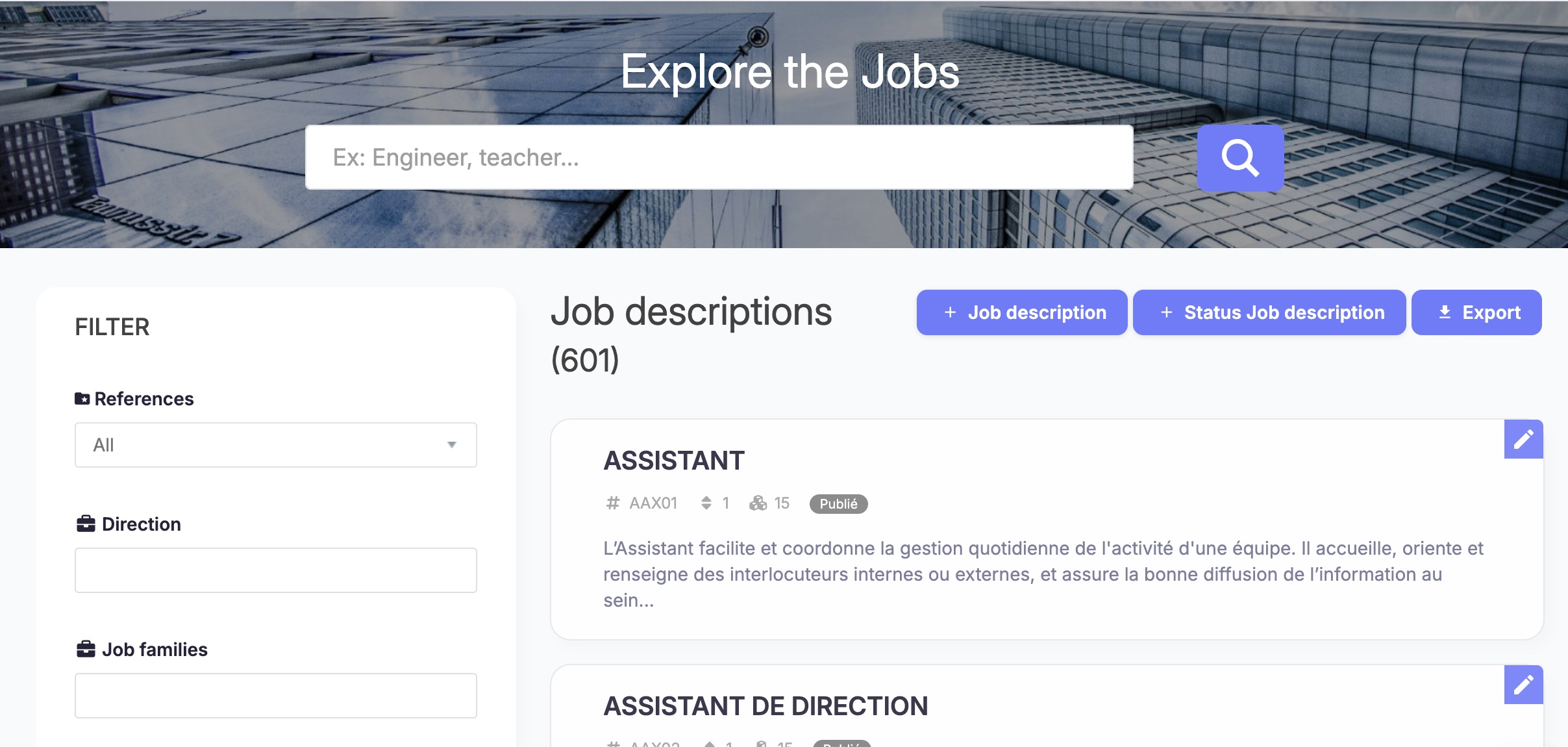
The manager job catalogue places title search above the cards and repository or organization criteria beside the results. Refine the list, then open the intended job description. Job names, statuses and custom field values are defined by your company.
Job search controls
Search fields may retain criteria from a previous visit. Review the selected values before searching.
| Group / control | Choices, initial state and clearing | Effect and example |
|---|---|---|
| Title search | Free text, initially empty. Erase text and run Search to clear. | Searches the current locale's translated job title. For an illustrative search, use a word from a title available in that language. A French title is not guaranteed to match an English-locale record. |
| References | Single selection; All initially. Choices come from available company references. Select All to remove this restriction. | Limits the catalogue to the selected repository; changing it runs a search. |
| Directions | Multiple company-defined values; initially none. Remove selected chips, then Search. | Narrows jobs by organizational direction. Available only when configured. |
| Job families | Multiple company-defined values; initially none. Remove selections, then Search. | Narrows by job family. Can be hidden by platform configuration. |
| Job description status | Single dynamic company status; initially blank. Choose the empty entry, then Search. | Find a particular publication state. Status captions are tenant-defined; a caption alone does not establish employee visibility. |
| Custom fields, e.g. “famille” | Type and values depend on the company's Job fields. Clear the selection, then Search. | Filters the configured field, separate from the standard family filter. |
| Consistency indicators | Independent checkboxes: jobs without skills, code or family; initially unchecked. Uncheck and Search. Classification may also appear when enabled. | Multiple checked indicators combine with AND in the repository query. Selecting “without skills” and “without code” finds jobs missing both. |
| Search / pagination | Search applies criteria; page controls fetch the selected result page. | Criteria narrow the same company catalogue. To clear criteria, remove text, reset selections and uncheck indicators, then Search. |
Criteria groups narrow the results. Optional controls include qualification level and development-related filtering, depending on activation.
Search the skills catalog
- Open Jobs and skills → Skills.
- Enter a skill title and choose one Group, one Repositories value and, where available, multiple Tags.
- Choose Search to apply the criteria.
Group → All removes the group restriction. Repositories and tags come from the company catalogue.
Reset search clears non-hidden search controls in the legacy script; press Search afterwards to refresh results.
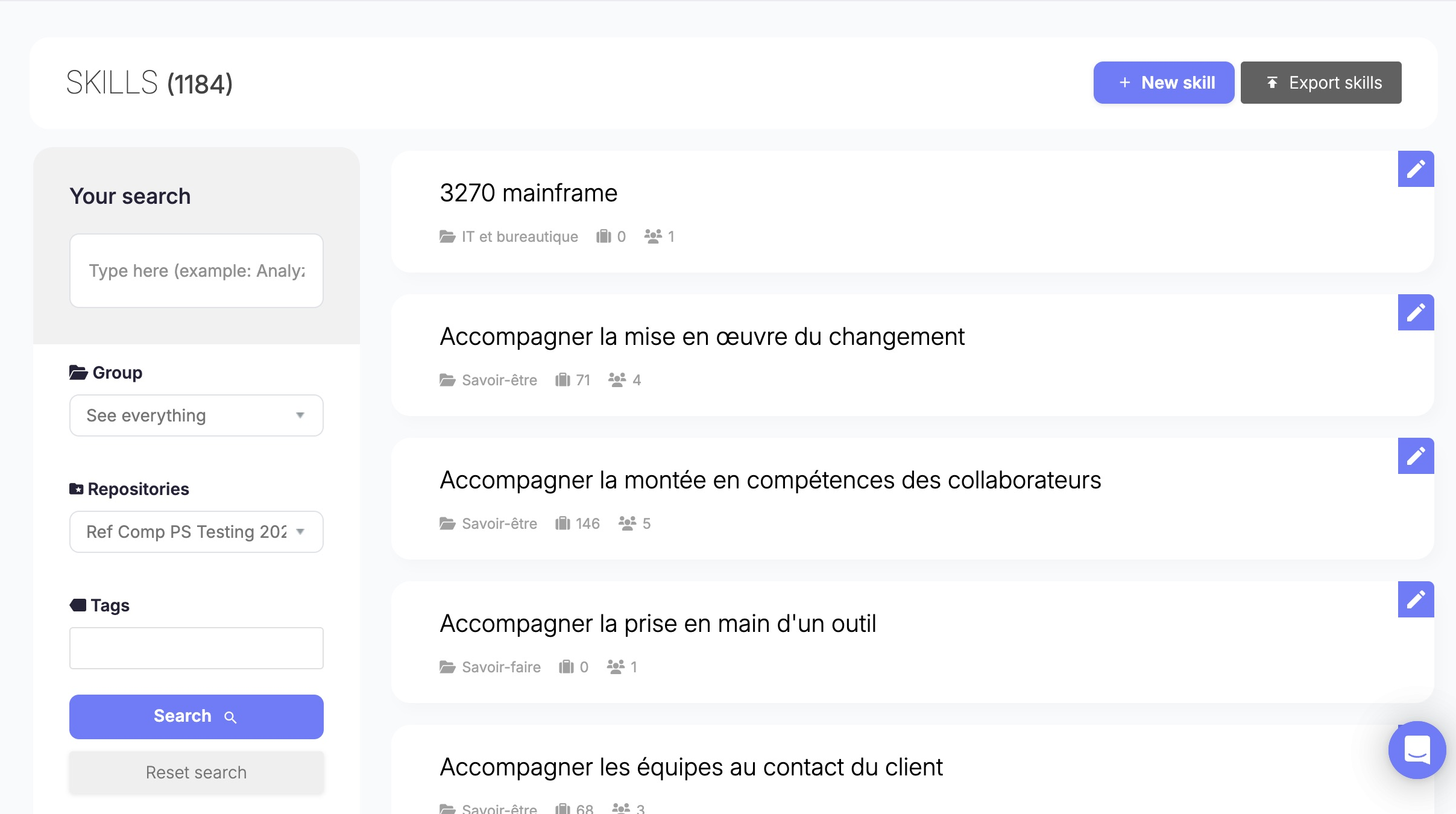
The skill catalog has its own title, group, repository and tag filters beside the result cards. Set criteria and use Search to refresh the list; these controls do not edit the skills themselves. Skills use a different filter panel from jobs: group, repository and tags. The visible total and filtered count describe different scopes.
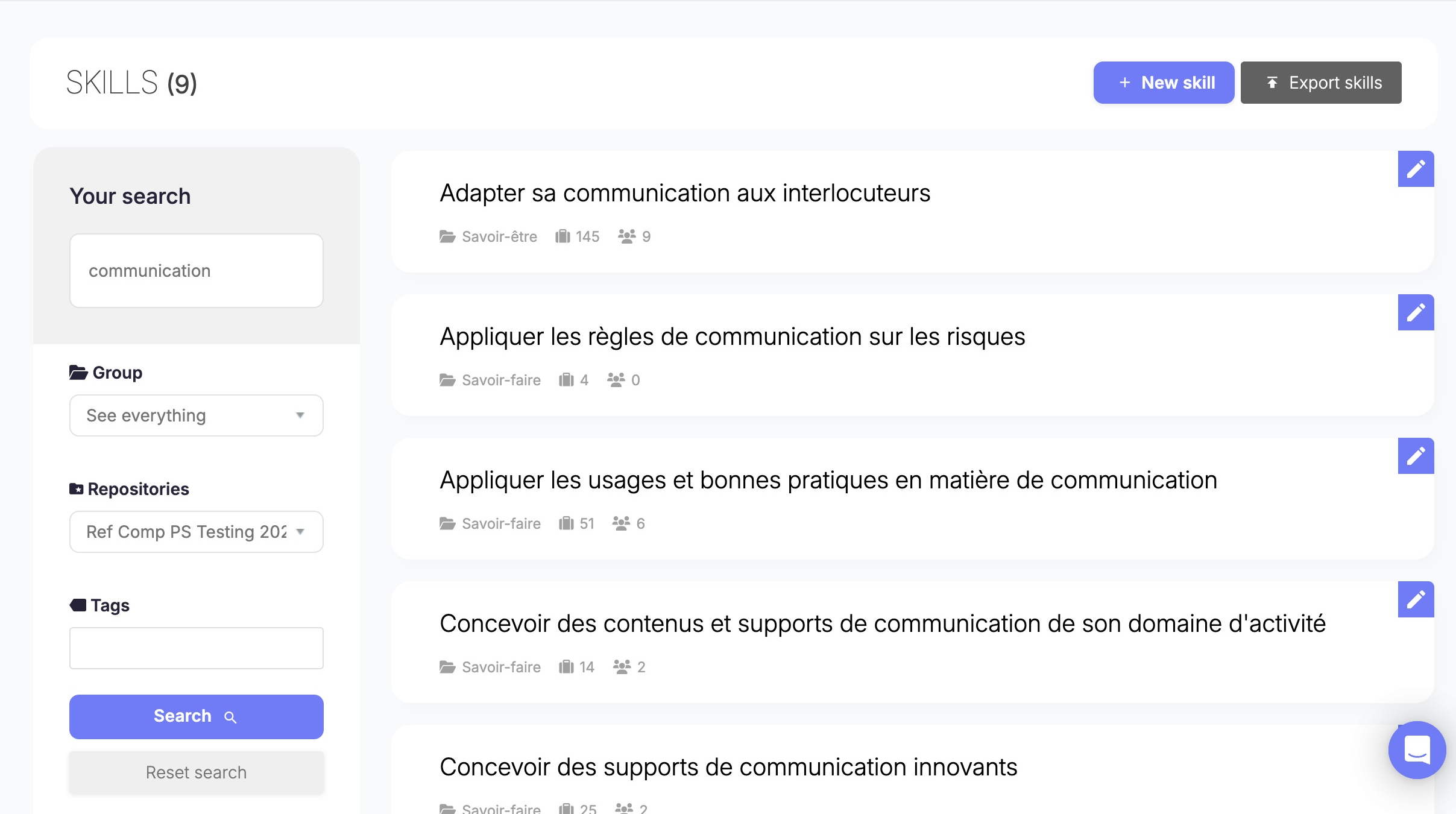
Search results show skills matching the selected criteria. Open the intended result after checking its label; similar names can refer to different skills. Search criteria change displayed results without editing skill records.
With authorized editing access, the pencil opens the skill form. Review the language tabs, title, description and mastery labels. An empty translation field may mean that locale is not populated. The Automatic translation action can help prepare a translation; review the result before saving it.
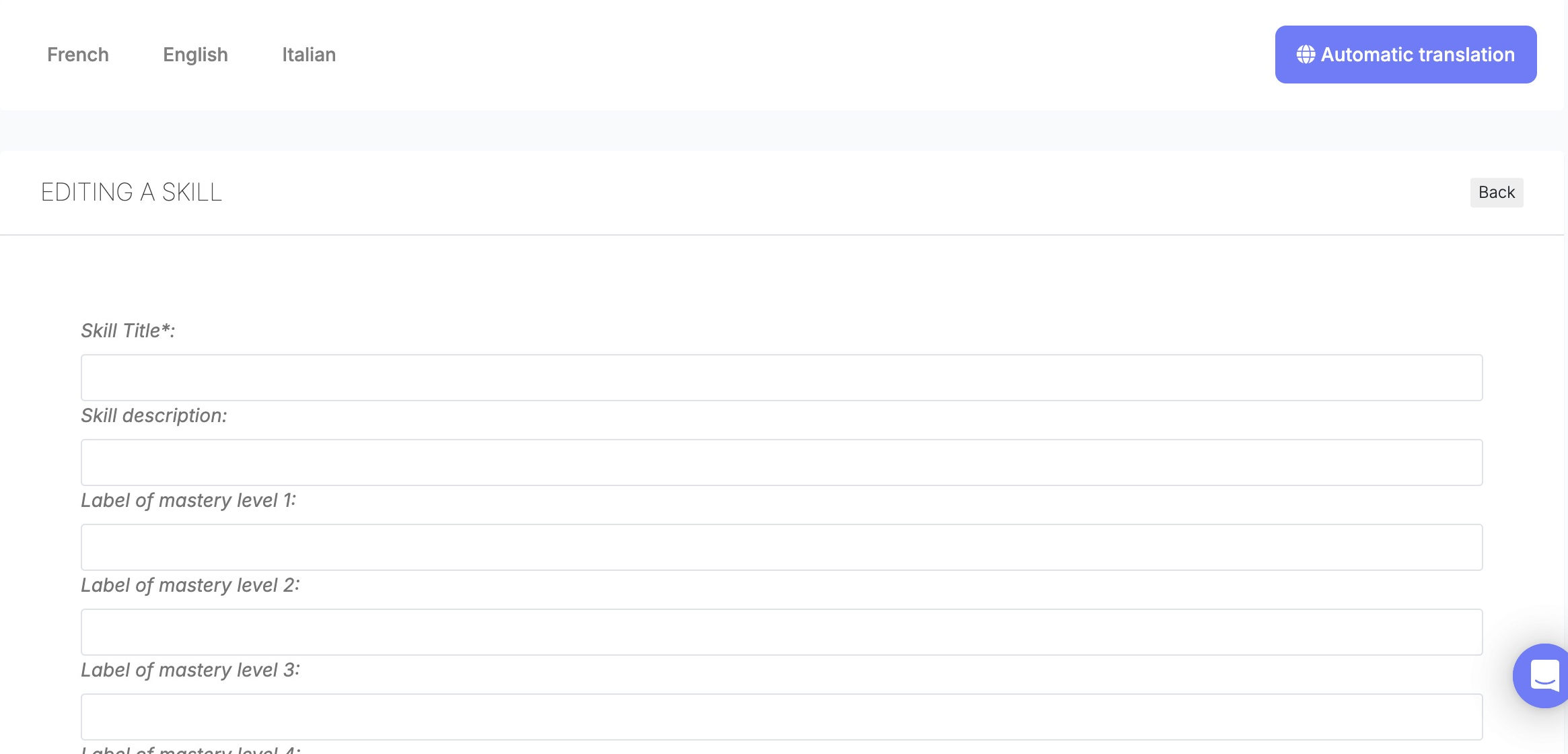
The skill editor separates translated title, description and mastery-level labels by language tab. Select the language to maintain, complete the relevant fields and save the translation.
Permissions and maintenance actions
Available maintenance actions depend on the permissions assigned to your role. See permissions and APIs.
Create a job and define its required skills
-
Open Jobs and skills → Job descriptions and choose Create.
-
Select the reference and enter the job title, code and descriptive fields. Add a mission, activities, expected results and any configured classification or tags.
-
Save the job. Its status controls whether it is available to employees; keep it in draft while it is being prepared.
-
Open the Skills tab and choose Add skills. Search for and select the skills that apply to the role. Choose the relevance indicator for each skill and confirm.
-
Choose Edit ratings to set the required mastery level and importance for each job–skill relationship. These values describe the role, not an employee assessment.
-
Choose Save changes to save the job and its skill relationships. Reopen the Skills tab to confirm that the skill and its ratings are still present. A job-level rating does not add an employee assessment.
The option to add an attached skill to every employee who holds the job updates employee skill profiles. Select it only when that change is intended. Leave the option clear when you are maintaining the job catalogue alone.
Explore jobs in personal space
Explore published jobs
- Switch to the personal workspace and open Career planner (Nos métiers in French).
- Browse the available job catalogue or company-defined family links. Job cards and recommendations depend on publication, configuration and profile data.
- Enter a job title or choose Advanced search to open Search results and Refine my search.
- Open an available job title to inspect the role. Favorites and feedback controls are separate personal actions, not catalogue editing.
The tabs Job descriptions, Favorites, Career plans select different journeys. A job description is a reference role, not an application to a vacancy; career-plan creation is covered separately.
Employee filters and reset behavior
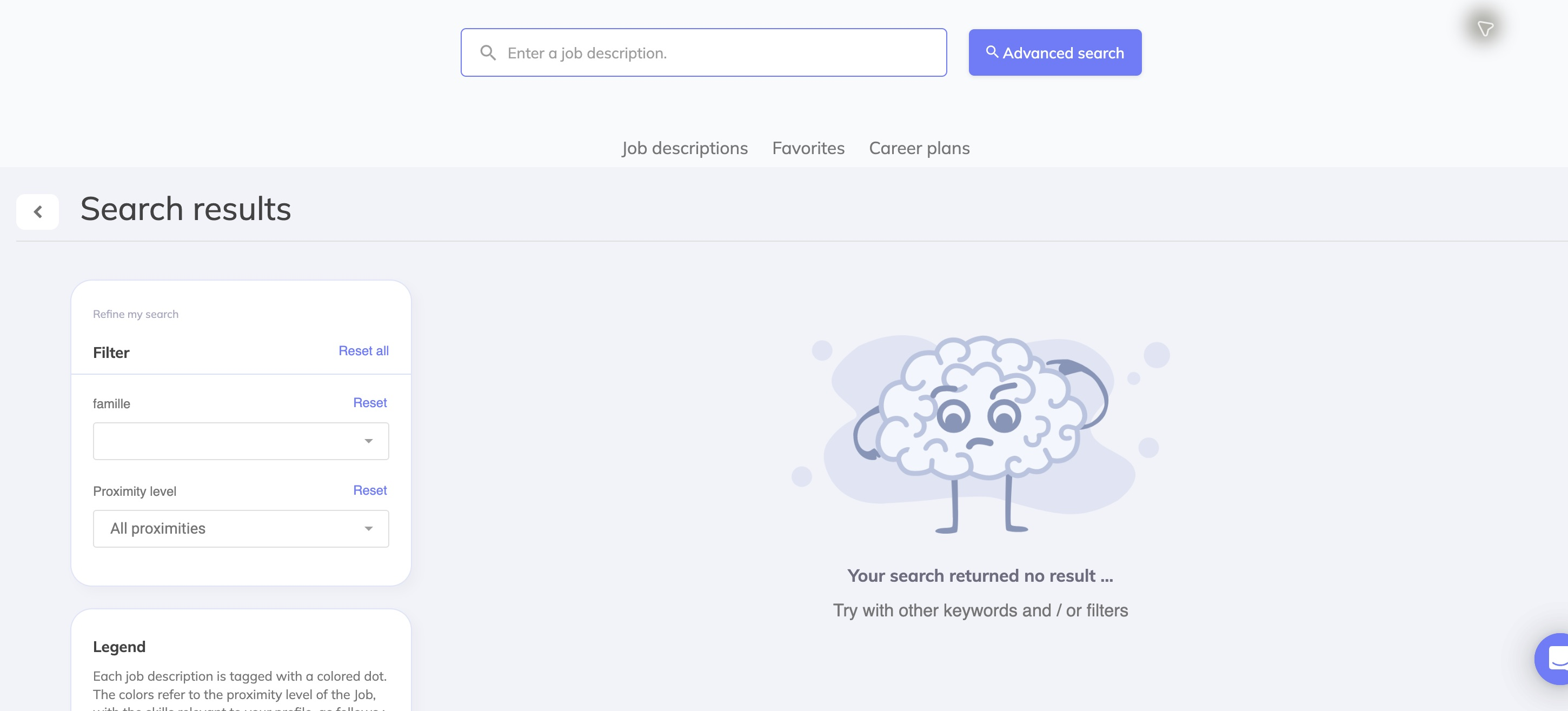
Use advanced criteria to refine job results. If no job matches, clear a restrictive criterion or revise the title; search criteria do not remove jobs from the framework.
| Control | Values / initial state | Usage and reset |
|---|---|---|
| Enter a job description | Free text. | Search job titles in the active language. Remove text manually to broaden the search. |
| Advanced search | Opens the search-results view. | Exposes the side panel; it does not grant catalogue-maintenance access. |
| Company Job fields | Dynamic selectors depend on configuration for the employee context. | Select company values to narrow results. Reset clears that group's visible input and reruns search. |
| Proximity level | Single choice: All proximities, Strong proximity, Medium proximity, Low proximity. Initially All. | Filters by proximity to the current profile's skills. The legend explains the colored dots; these are not approval decisions or assessed skill levels. Reset returns to All. |
| Reset all | Applies to advanced fields and proximity. | Resets advanced criteria and proximity. It does not clear the main title text; clear that separately for a broader search. |
| Back arrow | Returns to the job explorer. | Useful when advanced criteria return no results. |
Employee search combines title and advanced criteria within the current company and active locale. A profile change can affect proximity results.
What employees can see
The employee search is not the manager's consistency dashboard. It provides job exploration rather than catalogue maintenance. Published job visibility depends on the job status, active company, available translation and company configuration. See the technical guide before designing visibility rules.
Troubleshooting and business rules
- A manager sees a job but an employee does not: check its active state, publication status, translations and applicable employee-search configuration. Confirm the actual employee route; different catalogue implementations do not necessarily use identical filters.
- No results after changing language: check that titles exist in the selected locale, remove advanced filters and clear the main text.
- Reset still leaves a search restriction: employee Reset all preserves title text; manager Skills reset needs Search afterwards; manager Jobs criteria must be cleared individually before running Search again.
- A field or action is missing: check workspace, permissions and tenant activation with an administrator. Absence in one account does not prove the feature is unavailable everywhere.
- Expected mastery differs from an employee level: these are separate data. Do not overwrite assessments merely to align a reference job.
For implementation details and API behavior, see the technical guide.
Interface generations
The manager catalogue and employee job explorer described here use the legacy user interface. Nextgen catalogue APIs do not imply a separate customer-facing framework editor. Use the job and skill screens available to your role; see the technical guide for implementation boundaries.
Last updated on 3 November 2026