Past and future objectives — Redesign
Purpose and prerequisites
Employees and assigned evaluators use interview performance objectives to assess the previous period and agree on the next period's goals. The campaign must include the relevant past/future objective questions. Follow its role, phase and editing permissions. Development axes, training requests and tasks are described separately in the development-plan guide.
An objective contains key results used to measure progress. Each objective has a target date; weights determine its contribution to the assessment. An approved future objective and a completed past assessment are different results.
Employee workflow
- Open your assigned nextgen interview and start or resume preparation.
- In Objectifs passés, review the objectives shown for the previous period. Expand Afficher les scores et les résultats clés to assess each required key result using its configured control. A yes/no key result and a quantified key result use different inputs.
- In Objectifs à venir, review existing goals before adding another. Use manual creation where offered; enter the title, optional description and target date.
- Create at least one key result when the editor requires it. Give it a title and choose whether progress is quantified. Save the key result, then save the objective.
- Review the resulting status and weights. Employee proposals can need evaluator approval; use the actual status displayed rather than assuming creation means approval.
- Complete the other required interview questions and validate preparation. Return to flagged objectives and correct missing assessments or pending proposals before submitting.
Evaluator workflow
- Open the campaign in the manager workspace, find the assigned employee and start or resume evaluator preparation.
- Assess each past objective's key results. In the observed yes/no example, expanding the card exposed the evaluator's Oui / Non controls; selecting Oui recorded the test assessment.
- Review proposed future objectives, their dates, key results and weights. Accept or reject pending proposals through the controls available to your role. The checked tutorial states that total weights must equal 100%.
- If creating a goal directly, save its key results before saving the goal. In the fake-platform walkthrough, the evaluator-created objective appeared Approuvé, with one key result and 100% weight. This observation is not a universal default for every role.
- Validate all required answers before finishing preparation, then follow the campaign's interview and finalization steps. Objective validation does not sign the interview.
Business rules and validation
| Condition | Required action |
|---|---|
| Past-objective assessment rejected | Assess every required key result. The observed message was “Évaluez chaque objectif passé : chaque résultat clé doit être noté.” |
| Future-objective answer rejected | Keep at least one objective in progress or approved and resolve pending approvals, as required by the observed validation message. |
| Cannot create an objective | Supply its title, target date and at least one key result when requested. |
| Weights inconsistent | Review the total and the available weighting controls; the checked tutorial requires 100%. |
| Saved goal but preparation blocked | Review all required questionnaire sections, including skills and summary. |
| Cannot edit or approve | Confirm participant identity, evaluator assignment and current phase. Switching workspace preserves identity. |
Walkthrough evidence
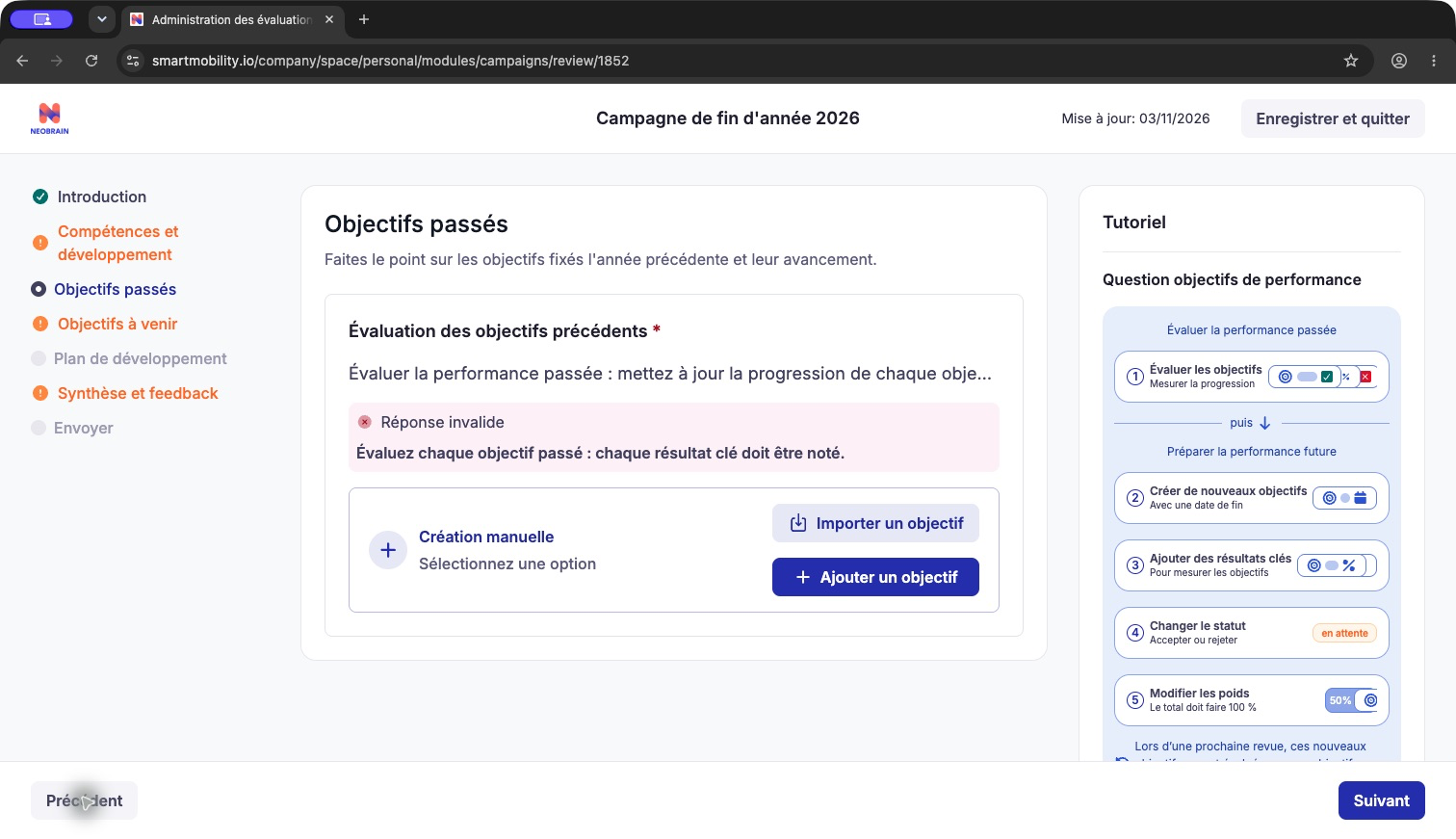
Captured before the missing past assessment was completed. This is an objective-validation screen, not a successful preparation submission.
Observed in application — fake PS Testing platform, 3 November 2026: the assigned evaluator created a future objective with a target date, one yes/no key result, Approved status and 100% weight. A separate past objective was created with one key result and assessed Oui. Final validation subsequently marked both objective sections complete. The review remained blocked by a separate skills-rendering issue; final submission, signature and later-period carryover were not verified.
Verified in code: nextgen front src/modules/ModuleConfig/Campaigns/modules/Reviews/modules/FormRender/components/renderers/PerformanceGoal/ contains the objective editor, key-result editor, cards and tutorial. Legacy and nextgen catalogs/models coexist; automatic conversion and identical permissions are not established. See the legacy guide for the older question controls.
Last updated on 3 November 2026